
Lesson

Objective:
- To determine the pattern of population settlement;
- estimate the index of population density;
- learn to identify regions with high and low population densities, explain the reason.
Teacher’s Guide
Divide the students so that there are 2 students in each group.
Download the worksheet by following this link:
Before proceeding with the lab work, review the safety rules by following the link:
Practical part
Step 1.
To calculate population density, take the region in which you live, 3 cities of republican significance RK (if you want to calculate 3 other settlements, not cities of republican significance, the choice is yours, you can get 3 additional regions). You can get data about them on the Internet (the latest information about the population in the Republic of Kazakhstan can be found on the website of the Ministry of Economy of the Republic of Kazakhstan). You need data on the land area and population of these regions.
In this paper, you were shown an example of Akmola Region and 3 cities of republican significance of the Republic of Kazakhstan.
| Settlement | Land area, km2 | Population |
| Akmola | 146 219 | 786 012 |
| Astana | 797,33 | 1 340 782 |
| Almaty | 682 | 2 147 113 |
| Shymkent | 1162,8 | 1 184 113 |
Step 2.
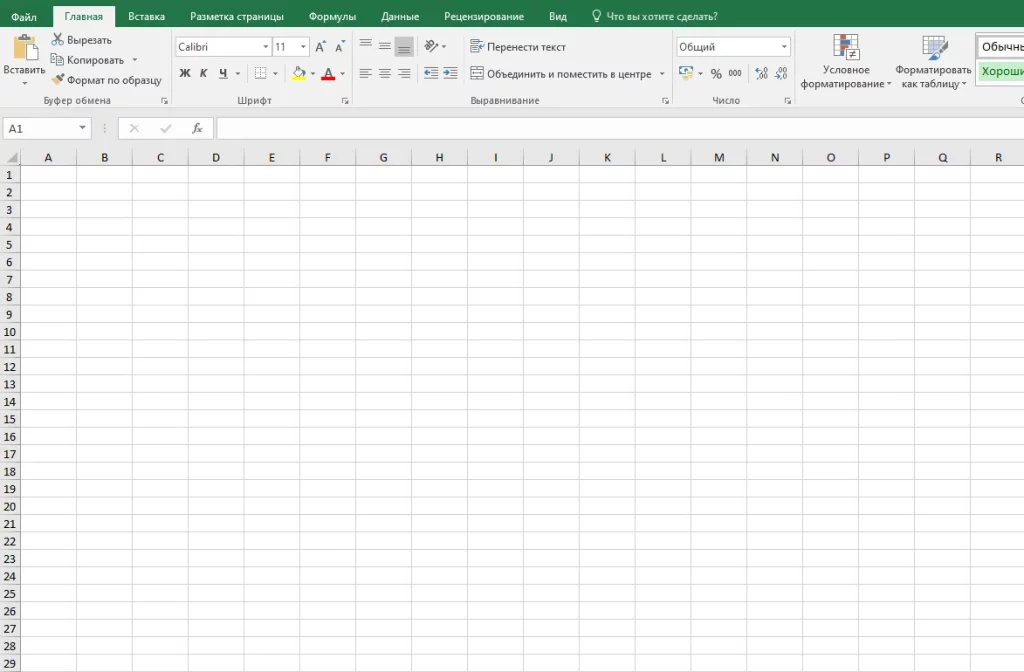
Create and open a new file in Microsoft Excel from your computer. You can create a file in two different ways:
Method one – click on the excel icon in the RUN menu or on your desktop.
Method two – right-click on an empty space and select “Microsoft Excel Sheet” from the context menu
Step 3.
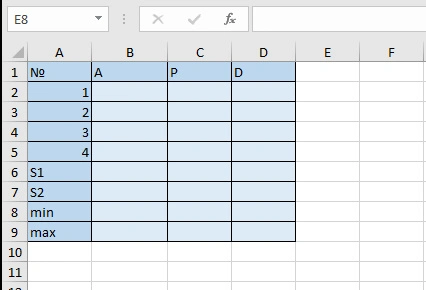
Create a table in an Excel file as shown below.
Where:
No. is the number of the locality;
A – the land area of the settlement;
P – population number;
D – population density;
S1 – total land area of the settlement;
S2 – total population in 4 settlements;
Min – minimum population density;
Max – maximum population density.
Step 4.
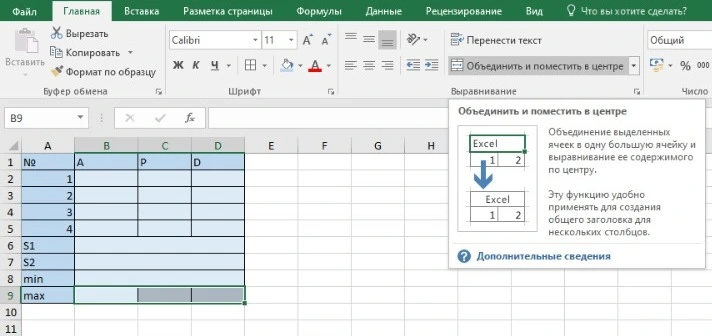
For convenience, combine columns B, C, D in 6 rows, columns B, C, D in 7 rows, columns B, C, D in 8 rows, and columns B, C, D in 9 rows. To do this, select Columns B, C, D and click the “Set and Place in the Center” button.
Step 5.
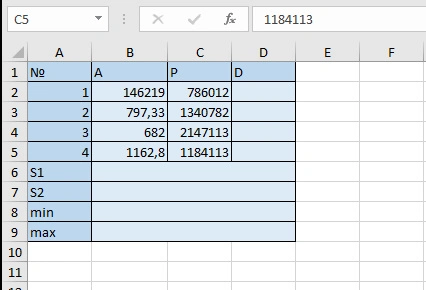
Enter the data in the table according to the column. The settlement standing here in the first number is Akmola region, the second is Astana city, the third is Almaty city, the fourth is Shymkent city.
Step 6.
To calculate population density, you divide the population by the area of the settlement:
Population Density = Population / Population Area
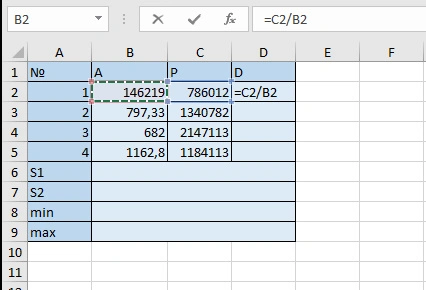
To calculate the population density of Akmola region in Excel, enter the following formula in cell D2: = C2 / B2
Step 7.
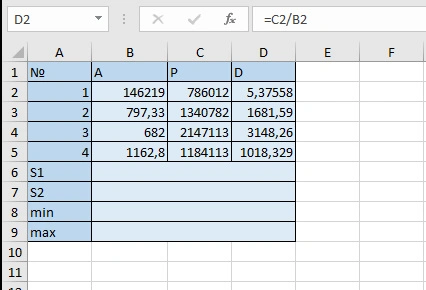
To calculate the remaining settlements, select cell D2, left-click the autofill marker (square in the lower right corner), and drag down.
The obtained results represent the population density in this area.
Step 8.
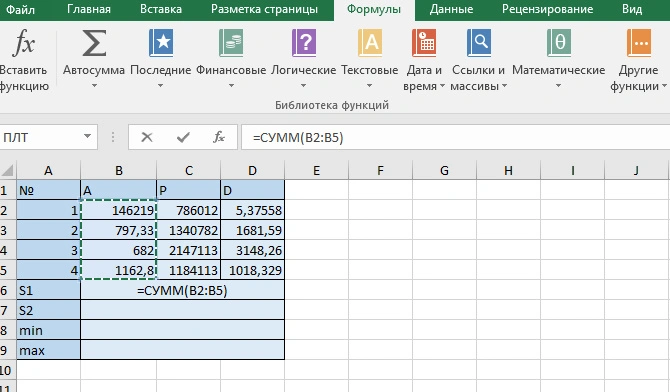
Now calculate the total land area in the 4 settlements. To do this, go to the cell next to cell S1, select “format”→ “autosummary”→ “sum” and check cells B2:B5.
Step 9.
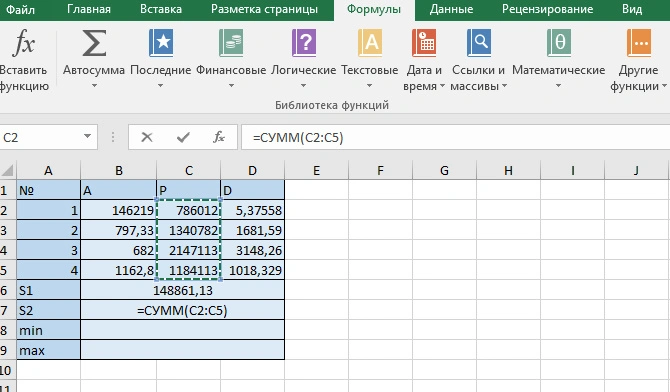
Calculate the total population of the settlement. To do this, go to the cell next to cell S2, select “format”→ “autosummary”→ “sum” and check cells C2:C5.
Step 10.
Among the four settlements, find the one with the minimum population density. To do this, go to the cell next to the Min cell, select “format”→ “autosummary”→ “minimum” and check cells D2:D5.
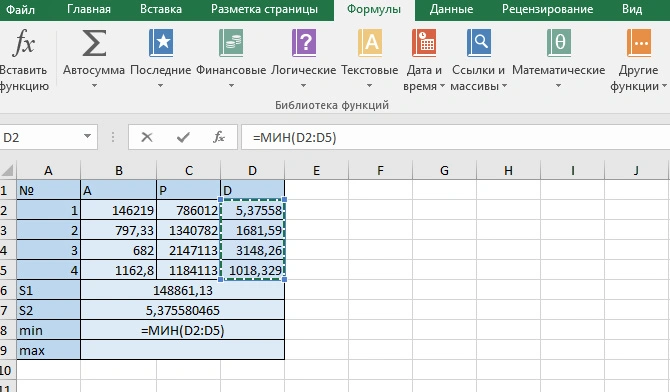
Step 11.
Among the four settlements, find the settlement with the maximum population density. To do this, go to the cell next to the Min cell, select “format”→ “autosummary”→ “maximum” and mark cells D2:D5.
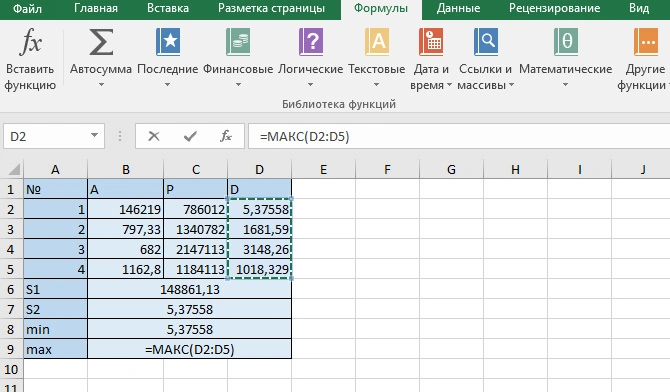
Step 12.
Answer the following questions and draw conclusions:
- What is population density?
- What data are needed to calculate population density?
- What formula is used to calculate population density?
- Which localities have minimum and maximum population densities?
Conclusion
Demographics, population distribution is always an important data for every state. With its calculation statistical data are collected. By doing this practical work, students learned how to calculate population density. In addition to improving his knowledge of natural science, he also improved his knowledge of computer science.