Week 3
Visually impaired version settings
The user must provide at least:
- choice of one of three font sizes;
- choice of one of three color schemes;
- option to disable images.
You write the HTML code to enable the visually impaired feature.
Step 1.
Up until now, you’ve been working on the Tilda website for free, that is, at the free rate. Now to write the HTML code, you will need to upgrade to the Personal rate. To do this, go to “Rates & Fees” and sign up temporarily for a fortnight. You don’t need to register any cards. Personal may ask you to confirm your email account when you switch to the tariff. You can also change your rate by going to your postal account and confirming that it is you.
Step 2.
Once you have changed your rate, go to “My Sites” and open “My Projects”. If you notice, the name of the site still hasn’t changed. To change it, click the “Settings” button, enter the word “Astana” in “TITLE” and save it by clicking the “save change” button.
Step 3.
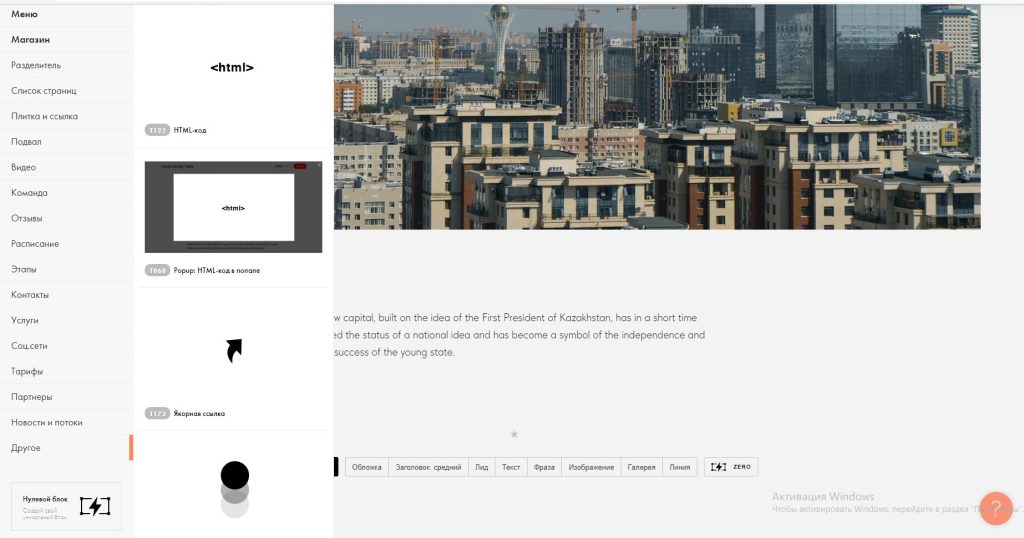
Open the site you created last week with the modified theme. Go down and click “Add”. Go to “Other” and select “T123” – HTML code.
Step 4.
Go to the “Content” section and enter and save the code shown below:
<script src="https://lidrekon.ru/slep/js/uhpv-full.min.js">

</script>

<a  id="specialButton" href="#"><img src="https://lidrekon.ru/images/special.png" id='glaz' alt="ВЕРСИЯ ДЛЯ СЛАБОВИДЯЩИХ" title="ВЕРСИЯ ДЛЯ СЛАБОВИДЯЩИХ"  /></a>

<style>

    #glaz {

        position:fixed;

        top:10px;

        left:10px;

        z-index: 99999;

    }

</style>
Step 5.
Click “Publish”, then click “Save and Continue”. You will then have a “Publish Successfully!” message on your screen. At the bottom you can see the website by clicking on “open page”.
Step 6.
Once you have opened the site there is an image of an eye in the top left corner. This is the button for the visually impaired. Click this button and try to open the site. And you can change the appearance of the site by clicking on the different settings at the top of the site.
You can see how the site works on the video:

Presentation of projects (presentation)
After completing their project development, the students should present their finished timetable of activities.
Conclusion
Nowadays, IT technology is developing very dynamically. We can find any information by visiting the internet and doing a search. It is better that these functions are available to everyone, including people with disabilities. One group of people with disabilities is the visually impaired. Having a feature added to their website specifically for them makes it easier for them to get information. So, in this project you have learned how to add this feature to the website. Not only have you learned how to add a feature for the visually impaired, but you have also learned how to create a website in Tilda. You can now create a website to your own taste by following this guide to your preferences.
Learners have gained a certain level of new knowledge for working on the Tilda website.
Assessment
PBL evaluation criteria:
Problem based learning (problem-oriented learning) is a learning method in which students acquire knowledge and skills by working on one project for 3 or 4 weeks to research and find an answer to a genuine, interesting and complex question, problem or challenge (then follow the PBL Rubrics link to the Rubrics).
Reflection