
Lesson 1
Goal
- Creating a game that will help you increase your short-term memory.
- It is necessary to write down the logic of its implementation with Arduino
- Making a case (3D, made of wood or cardboard)
Expected results
After developing the project, students:
- Learn how to work with Arduino
- Understands the logic of creating a game
- 3D modeling
- will learn how to work with wood or cardboard
- Learn programming
Interdisciplinary connections
- Computer science
- Physics
- Art
Teacher’s Guide
- Students should be divided into 5 groups
- when using hot glue, care should be taken
- When using a stationery knife or scissors, care must be taken
- Observation of caution when connecting electronic devices to the current
- Checking the correct wiring and providing students with wiring diagrams
Introduction
Short-term memory allows you to answer difficult questions without preparation, improvise and quickly assess the situation. Previously, it was believed that every person has a certain short-term memory, but recent research in the field of cognitive science and psychology has proved that we can train it.
What is short-term memory and why is it important?
It is a “reservoir” for short-term storage of thoughts and ideas, which we can extract and use to make any decisions at any time.When it is necessary to answer a question without preparation, short-term memory allows you to speak simultaneously and mentally plan subsequent statements. It is also used when we read. To understand the essence of the material, we must remember what we read before and link it with what we read next. In addition, short-term memory helps to ignore unnecessary information, including everything that bothers us. Especially in our time, the ability to fully focus on the task is very important.
Now we all suffer from an overabundance of information, social networks and various kinds of warnings that require attention day and night. The brain has to make a lot of effort to determine what information it should remember and what should be remembered. All this causes anxiety and stress and further reduces memory.
How to make short-term memory work at full capacity
There are two ways.
First, reduce the number of distractions and thus reduce stress levels. This has a positive effect not only on memory, but also on all spheres of life.
But sometimes it’s impossible. We cannot predict when the boss will demand an urgent report from us or when our loved one will get sick. To be honest, we usually like the variety of information that is currently presented on the web.
So, the second option remains-to develop and strengthen short-term memory.
How to strengthen short-term memory
Brain Exercises
In particular, the so-called “double n-back problem”. During this exercise, you train your short-term memory by tracking a series of images and discovering that a certain image appeared earlier.
Studies have confirmed that such exercises help strengthen short-term memory, in particular, scientists such as Jackie Au, Ellen Sheehan, Nancy Tsai. But if all the exercises are unstable, it will not help. Short-term memory, like our muscles, requires regular training. Researchers recommend allocating 25 minutes a day for this.
These notes are taken from an article by foreign scientists
Other factors are also prescribed, In short, everything affects our sleep, sports, proper nutrition. What suits us for the game we are doing in this project is just an exercise, so we attach importance to this exercise.
So, we have LEDs in four different colors and buttons in these colors
At the beginning of the first game, the LEDs should light up four times, no matter in what order. Then we have to click and repeat the buttons of the same color. If we find the right one, we produce a sound that indicates that we have moved to the next level through the active buzzer, and if we find the wrong one, we produce a sound that indicates that we have lost. With each correct earnings, the number of fires increases, i.e. with a four-fold combustion after a five-fold combustion, the same thing repeats after six.
Practical part of the work
Now let’s start implementing our game
First, open the Arduino IDE, if not installed, install it by link
after opening the platform for writing code, click the Tools button at the top
Then select the port
The code will not be sent to Arduino if the Port is not selected
The arduino must be connected to the computer via a blue cable
In the figure below, we connected the buttons and LEDs to the arduino board
Connect also
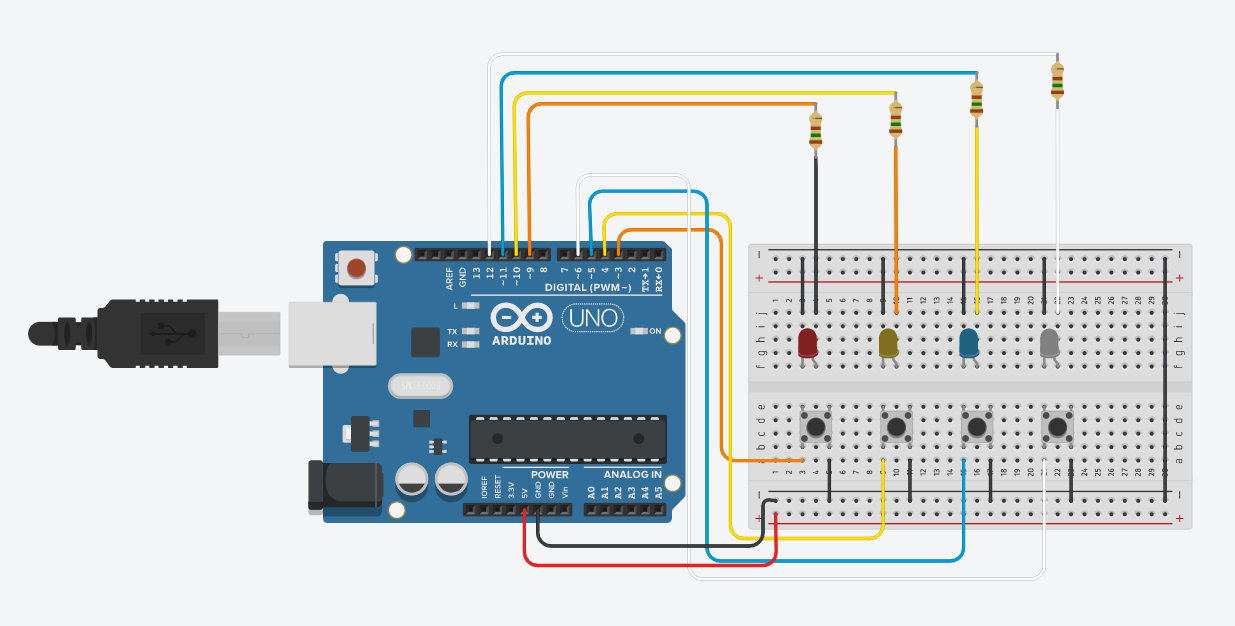
Now, when the buttons are pressed, we light the corresponding LED.
To do this, you need to run the code below
Step 1 Write this code on Arduino IDE or copy
then click on the button listed below
#define redbtn 3


#define yellowbtn 4


#define bluebtn 5
#define whitebtn 6

#define redled 9
#define yellowled 10
#define blueled 11
#define whiteled 12

void setup(){
  Serial.begin(9600);
  pinMode(redled,OUTPUT);
  pinMode(yellowled,OUTPUT);
  pinMode(blueled,OUTPUT);
  pinMode(whiteled,OUTPUT);
  pinMode(whitebtn,INPUT_PULLUP);
  pinMode(bluebtn,INPUT_PULLUP);
  pinMode(yellowbtn,INPUT_PULLUP);
  pinMode(redbtn,INPUT_PULLUP);

}

void loop(){
  if(!digitalRead(redbtn)){
    digitalWrite(redled,HIGH);
    delay(150);}
  else digitalWrite(redled,LOW);
  if(!digitalRead(yellowbtn)){
    digitalWrite(yellowled,HIGH);
    delay(150);}
  else digitalWrite(yellowled,LOW);
  if(!digitalRead(bluebtn)){
    digitalWrite(blueled,HIGH);
    delay(150);}
  else digitalWrite(blueled,LOW);
  if(!digitalRead(whitebtn)){
    digitalWrite(whiteled,HIGH);
    delay(150);}
  else digitalWrite(whiteled,LOW);
}
With this code we can control the LED with buttons. Now let’s consider lighting the lights in a random sequence. Take a look at the code below.
#define redled 9
#define yellowled 10
#define blueled 11
#define whiteled 12

int leds[] = {redled,yellowled, blueled, whiteled};

void setup(){
  Serial.begin(9600);
  pinMode(redled,OUTPUT);
  pinMode(yellowled,OUTPUT);
  pinMode(blueled,OUTPUT);
  pinMode(whiteled,OUTPUT);
  randomSeed(analogRead(0));
  flashLed();

}

void loop(){
}
void flashLed(){
   for (int i = 0; i < 4; i++) {
      int shoosen_led = random(4);
      flash(leds[shoosen_led]);
    }
  }
void flash(int led){
  delay(200);
  digitalWrite(led,HIGH);
  delay(500);
  digitalWrite(led,LOW);
  }
When we run this code, four times random lights light up between the LEDs
Now let’s connect the active buzzer and screen to our circuit
Add as in the diagram shown below
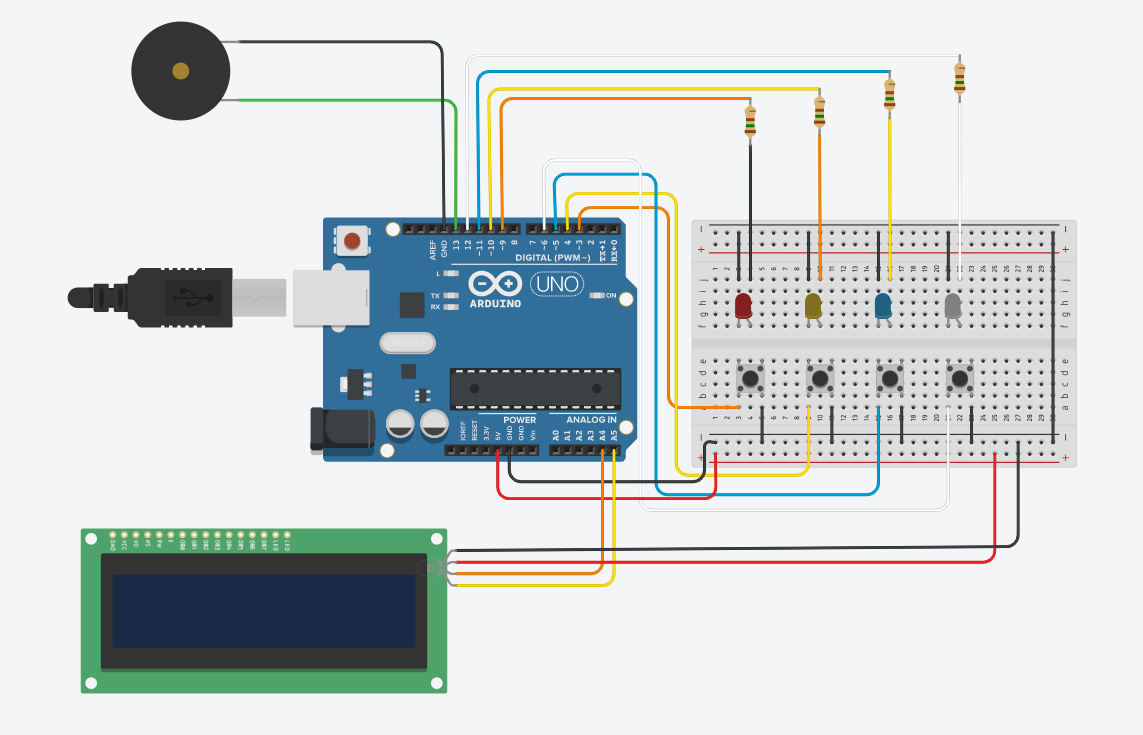
Try running this code, the full code is provided below
#include <LiquidCrystal_I2C.h>
LiquidCrystal_I2C lcd(0x27,16,2);


#define redbtn 3
#define yellowbtn 4
#define bluebtn 5
#define whitebtn 6

#define redled 9
#define yellowled 10
#define blueled 11
#define whiteled 12


#define NOTE_B0  31
#define NOTE_C1  33
#define NOTE_CS1 35
#define NOTE_D1  37
#define NOTE_DS1 39
#define NOTE_E1  41
#define NOTE_F1  44
#define NOTE_FS1 46
#define NOTE_G1  49
#define NOTE_GS1 52
#define NOTE_A1  55
#define NOTE_AS1 58
#define NOTE_B1  62
#define NOTE_C2  65
#define NOTE_CS2 69
#define NOTE_D2  73
#define NOTE_DS2 78
#define NOTE_E2  82
#define NOTE_F2  87
#define NOTE_FS2 93
#define NOTE_G2  98
#define NOTE_GS2 104
#define NOTE_A2  110
#define NOTE_AS2 117
#define NOTE_B2  123
#define NOTE_C3  131
#define NOTE_CS3 139
#define NOTE_D3  147
#define NOTE_DS3 156
#define NOTE_E3  165
#define NOTE_F3  175
#define NOTE_FS3 185
#define NOTE_G3  196
#define NOTE_GS3 208
#define NOTE_A3  220
#define NOTE_AS3 233
#define NOTE_B3  247
#define NOTE_C4  262
#define NOTE_CS4 277
#define NOTE_D4  294
#define NOTE_DS4 311
#define NOTE_E4  330
#define NOTE_F4  349
#define NOTE_FS4 370
#define NOTE_G4  392
#define NOTE_GS4 415
#define NOTE_A4  440
#define NOTE_AS4 466
#define NOTE_B4  494
#define NOTE_C5  523
#define NOTE_CS5 554
#define NOTE_D5  587
#define NOTE_DS5 622
#define NOTE_E5  659
#define NOTE_F5  698
#define NOTE_FS5 740
#define NOTE_G5  784
#define NOTE_GS5 831
#define NOTE_A5  880
#define NOTE_AS5 932
#define NOTE_B5  988
#define NOTE_C6  1047
#define NOTE_CS6 1109
#define NOTE_D6  1175
#define NOTE_DS6 1245
#define NOTE_E6  1319
#define NOTE_F6  1397
#define NOTE_FS6 1480
#define NOTE_G6  1568
#define NOTE_GS6 1661
#define NOTE_A6  1760
#define NOTE_AS6 1865
#define NOTE_B6  1976
#define NOTE_C7  2093
#define NOTE_CS7 2217
#define NOTE_D7  2349
#define NOTE_DS7 2489
#define NOTE_E7  2637
#define NOTE_F7  2794
#define NOTE_FS7 2960
#define NOTE_G7  3136
#define NOTE_GS7 3322
#define NOTE_A7  3520
#define NOTE_AS7 3729
#define NOTE_B7  3951
#define NOTE_C8  4186
#define NOTE_CS8 4435
#define NOTE_D8  4699
#define NOTE_DS8 4978


int melody[] = {
  NOTE_G4, 0, NOTE_G4, NOTE_D5,
  NOTE_C5, 0, NOTE_AS4, 0,
  NOTE_A4, 0, NOTE_A4, NOTE_A4,
  NOTE_C5, 0, NOTE_AS4, NOTE_A4,
  NOTE_G4,0, NOTE_G4, NOTE_AS5,
  NOTE_A5, NOTE_AS5, NOTE_A5, NOTE_AS5,
  NOTE_G4,0, NOTE_G4, NOTE_AS5,
  NOTE_A5, NOTE_AS5, NOTE_A5, NOTE_AS5,
  NOTE_G4, 0, NOTE_G4, NOTE_D5,
  NOTE_C5, 0, NOTE_AS4, 0,
  NOTE_A4, 0, NOTE_A4, NOTE_A4,
  NOTE_C5, 0, NOTE_AS4, NOTE_A4,
  NOTE_G4,0, NOTE_G4, NOTE_AS5,
  NOTE_A5, NOTE_AS5, NOTE_A5, NOTE_AS5,
  NOTE_G4,0, NOTE_G4, NOTE_AS5,
  NOTE_A5, NOTE_AS5, NOTE_A5, NOTE_AS5
 };

int noteDurations[] = {
  4,4,4,4,
  4,4,4,4,
  4,4,4,4,
  4,4,4,4,
  4,4,4,4,
  4,4,4,4,
  4,4,4,4,
  4,4,4,4,
  4,4,4,4,
  4,4,4,4,
  4,4,4,4,
  4,4,4,4,
  4,4,4,4,
  4,4,4,4,
  4,4,4,4,
  4,4,4,4,
  4,4,4,4,
  4,4,4,4,
  4,4,4,4,
  4,4,4,4,
  4,4,4,4,
  4,4,4,4,
  4,4,4,4,
  4,4,4,4,
  4,4,4,4,
  4,4,4,4,
  4,4,4,4,
  4,4,4,4,
  };


int current_level = 4;
int leds[] = {redled,yellowled, blueled, whiteled};
int output_leds[30]={};
int input_leds[30]={};
int mill = 0;
int speed_of_flashing = 500;
int index = 0;
bool waitforpress = false;
unsigned long timer = 0;
int deadline = 59;

void setup() {
  lcd.init();
  lcd.backlight();

  Serial.begin(9600);
  pinMode(redled,OUTPUT);
  pinMode(yellowled,OUTPUT);
  pinMode(blueled,OUTPUT);
  pinMode(whiteled,OUTPUT);
  pinMode(whitebtn,INPUT_PULLUP);
  pinMode(bluebtn,INPUT_PULLUP);
  pinMode(yellowbtn,INPUT_PULLUP);
  pinMode(redbtn,INPUT_PULLUP);
  randomSeed(analogRead(0));
  flashLed();
  //test();

}

void loop() {
  delay(100);
  if(waitforpress){
    if(!digitalRead(bluebtn) and millis()-mill>200){
    digitalWrite(blueled,HIGH);
    delay(150);
    Serial.println("blue");
    mill = millis();
    if(output_leds[index]==blueled){
      index += 1;
      if(index==current_level){

        nextlevel();
        }
      }
    else {
      test();
      Serial.println("Game Over");
      waitforpress = false;

      }
    }
  else digitalWrite(blueled,LOW);
  if(!digitalRead(yellowbtn) and millis()-mill>200){
    digitalWrite(yellowled,HIGH);
    delay(150);
    Serial.println("yellow");
    mill = millis();
    if(output_leds[index]==yellowled){
      index += 1;
      if(index==current_level){

        nextlevel();
        }
      }
    else {
      test();
      Serial.println("Game Over");
      waitforpress = false;

      }
    }
  else digitalWrite(yellowled,LOW);
  if(!digitalRead(redbtn) and millis()-mill>200){
    digitalWrite(redled,HIGH);
    delay(150);
    Serial.println("red");
    mill = millis();
    if(output_leds[index]==redled){
      index += 1;
      if(index==current_level){

        nextlevel();
        }
      }
    else {
      test();
      Serial.println("Game Over");
      waitforpress = false;

      }
    }
  else digitalWrite(redled,LOW);

  if(!digitalRead(whitebtn) and millis()-mill>200){
    digitalWrite(whiteled,HIGH);
    delay(150);
    Serial.println("white");
    mill = millis();
    if(output_leds[index]==whiteled){
      index += 1;
      if(index==current_level){

        nextlevel();
        }
      }
    else {
      test();
      Serial.println("Game Over");
      waitforpress = false;
      }
    }
  else digitalWrite(whiteled,LOW);
    }
    lcd.setCursor(1,0);
    lcd.print("you are Genius");

    lcd.setCursor(0,1);
    lcd.print("lvl:");

    lcd.setCursor(4,1);
    lcd.print(current_level-3);

    lcd.setCursor(6,1);
    lcd.print("time 0:");

    if(millis()-timer>1000 and deadline>0){
      lcd.clear();
      lcd.setCursor(13,1);
      lcd.print(deadline);
      deadline -= 1;
      timer = millis();
      }
    if(deadline==0){
      lcd.clear();
      lcd.setCursor(1,1);
      lcd.print("GAME OVER!!!");
      current_level = 3;
      test();
      nextlevel();
      }
}
void flashLed(){
   for (int i = 0; i < current_level; i++) {
      int shoosen_led = random(4);
      flash(leds[shoosen_led]);
      output_leds[i] = leds[shoosen_led];
    }
   waitforpress = true;
  }
void flash(int led){
  delay(200);
  digitalWrite(led,HIGH);
  delay(speed_of_flashing);
  digitalWrite(led,LOW);
  }

void nextlevel(){
  for (int i = 0; i < 4; i++) {
      digitalWrite(leds[i],LOW);
    }
    lcd.clear();
  delay(1000);
  deadline = 59-(current_level-4)*5;
  current_level += 1;
  index = 0;
  flashLed();
  }
void test(){
  for (int thisNote = 0; thisNote < 64; thisNote++) {
    int noteDuration = 750 / noteDurations[thisNote];
    tone(13, melody[thisNote], noteDuration);
    int pauseBetweenNotes = noteDuration * 1.30;
    delay(pauseBetweenNotes);
    noTone(13);
  }
  }