
Lesson 3
Creating a telegraph
In this lesson students:
- create a telegraph for communication
- assembling a telegraph connection diagram
- assembling a speaker for a telegraph
- write a program to display
Assembly instructions
1 | Measure the width of your magnet.
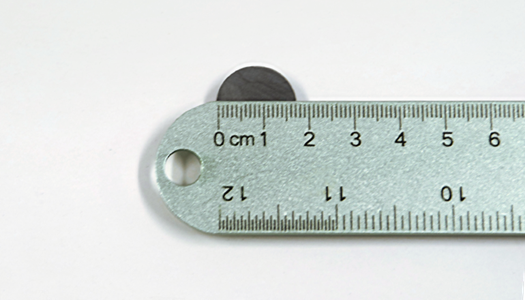
2 | Fold a piece of paper so that it is slightly wider than the magnet and secure it with tape. This will be used to wind the wire
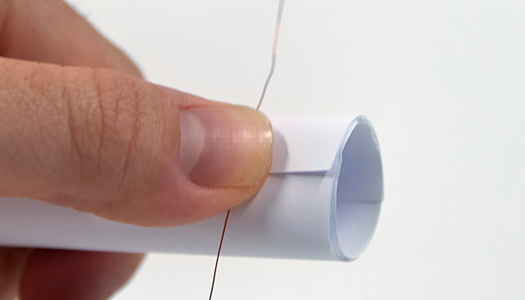
3 | Leave about 15 cm of wire at the beginning and wind the wire about 50 times. The more you turn it up, the louder the speaker.

4 | When you have finished the coil, trim the wire, leaving the second 6 inches of wire at the end. Slide the coil off the tube.
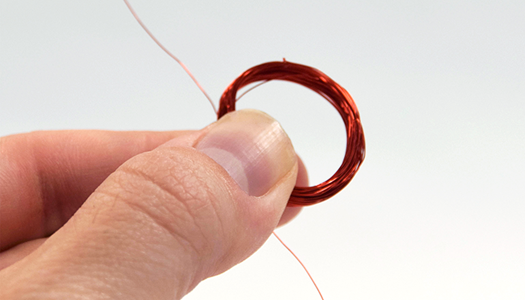
5 | Tape the coil on opposite sides, then carefully sand the ends of the wires to remove the insulation.
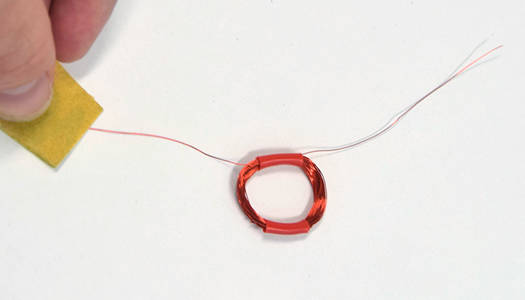
6 | Glue the spool to the bottom of the cup in the center.
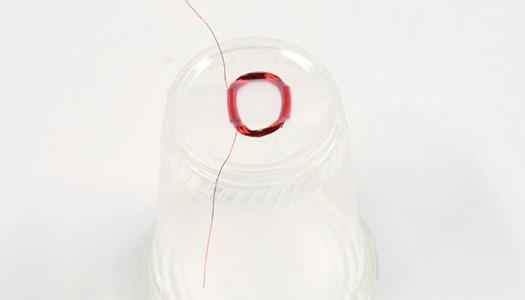
7 | Place the magnet in the center of the coil and secure it with tape.
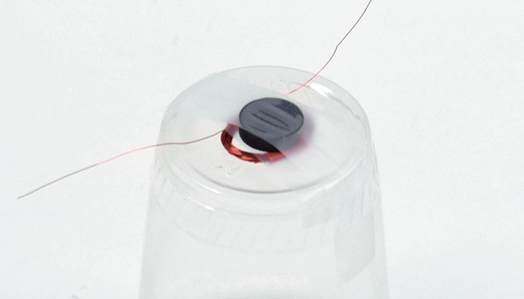
8 | Disconnect the alligator clips from the solenoid wires and attach them to the bowl speaker wires.
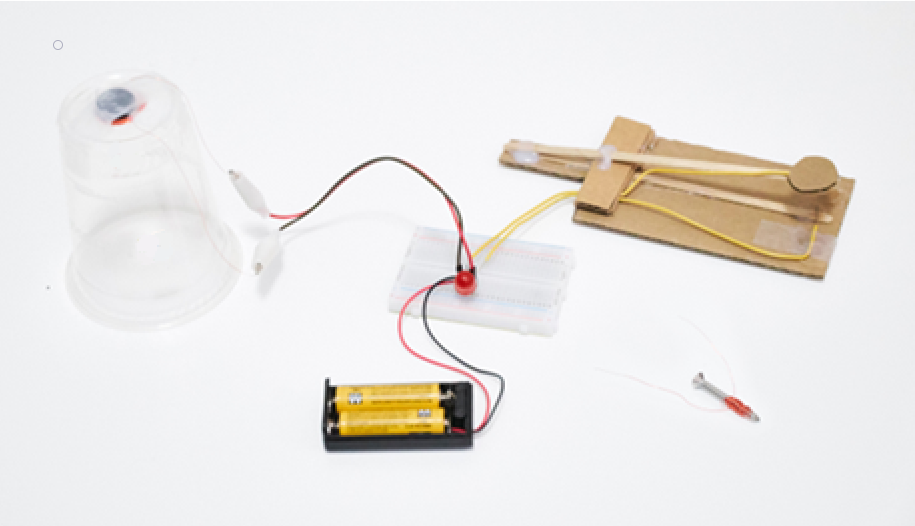
Great job! You’ve made a speaker. Press the switch until it clicks. Move the speaker closer to your ear if you can’t hear it.
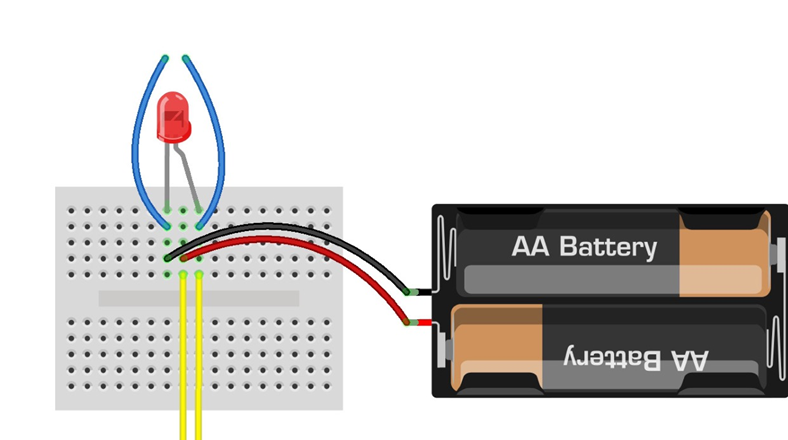
1 | Remove the LED and wires from the clothespin switch and speaker from the breadboard. You will re-insert them at new points.
2 | Connect the Arduino Uno and the breadboard using 5 jumpers as shown in the diagram. Wire color is useful for organization but does not affect functionality.
3 | Поместите светодиодную лампочку так, чтобы более длинная ножка (+) располагалась, как показано на схеме.
4 | Insert the resistor leads into the breadboard as shown.
5 | Connect the clothespin switch wires to the breadboard.
6 | Connect the plastic cup speaker to the breadboard by inserting the male ends of the alligator clips as shown.
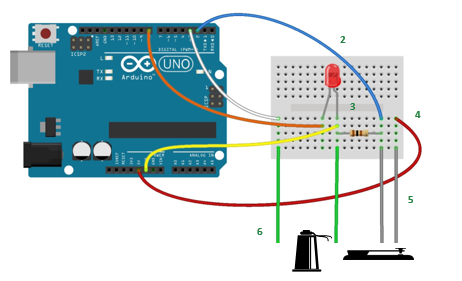
Send Morse code with your telegraph
Click on the switch. You will see the LED light up and hear corresponding sounds from the speaker.
Congratulations! You’re ready to visualize data and communicate using electricity!
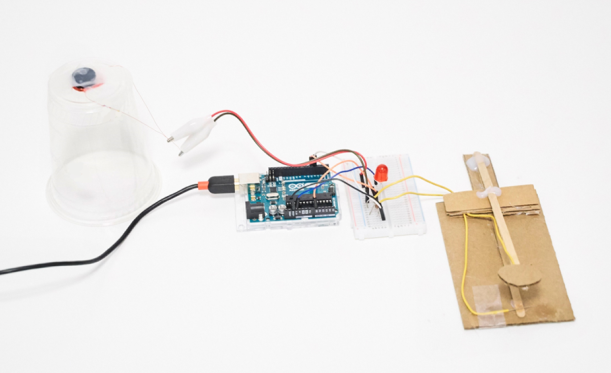
It is also necessary to write a program to display data from the telegraph
You must use a port monitor to output data
Because it uses a sophisticated Morse code library, the code is simply provided to students and downloaded.
const String DELIMETER = ",";    //Cordoba add-in expects a comma delimited string
const byte ledPin = 8;           //LED output pin
const byte keyPin = 2;           //telegraph key input pin
const byte speakerPin = 3;       //cup speaker output pin

/*
 * Telegraph key state (0=off, 1=on)
 */
byte keyState = 0;

/*
 * The timing of dots and dashes and spaces are very strict in the Morse Code specification.
 * The following values are the actual values:
 */
int wpm = 10;                     //words per minute - inidicates Morse Code speed
int unit = 1200/wpm;              //Time = 1200/wpm = unit in milliseconds
int dotTime     = unit;           //dot mark duration
int dashTime    = unit  * 3;      //dash mark duration
int markSpace   = unit;           //duration between marks
int signalSpace = unit  * 3;      //duration between letters
int wordSpace   = unit  * 7;      //duration between words

/*
 * For practical purposes a range is going to give better results than specific timings.
 * The following values are used in place of the strict values above.
 * Play around with the values below to get the best results.
 */
int dotMin          = dotTime/4;
int dotMax          = dashTime/2;

int dashMin         = dotMax;
int dashMax         = dashTime+(dotTime*2);

int signalSpaceMin  = signalSpace*2;
int signalSpaceMax  = wordSpace*2;

int wordSpaceMin    = signalSpaceMax;

/*
 * Timestamps and intervals used to determine duration of marks and spaces
 */
unsigned long currentTime = 0;    //current timestamp
unsigned long markTime    = 0;    //start of a positive signal (dot or dash)
unsigned long spaceTime   = 0;    //start of absence of signal (space)
unsigned long markInterval = 0;   //time interval for a mark
unsigned long spaceInterval = 0;  //time interval for a space/pause

/*
 * Program control variables to determine markTime and spaceTime processing
 */
bool startMark = 0;               //boolean to indicate a current signal
bool gotMark = 0;                 //indicates that we got a mark and can now process markTime
bool startSpace = 0;              //boolean to indicate a current pause
bool gotSpace = 0;                //indicates that we got a pause and can now process spaceTime
bool firstMark = 0;               //boolean to indicate that an intitial mark has been processed so we can now add space(s)

/*
 * Incoming serial data variables
 */
String mInputString = "";         // string variable to hold incoming data
boolean mStringComplete = false;  // variable to indicate mInputString is complete (newline found)
int mSerial_Interval = 75;        // Time interval between serial writes
unsigned long mSerial_PreviousTime = millis();    // Timestamp to track serial interval

/*
 * Variables sent to Excel
 */
String morseMessage = "";         //variable to hold our signal marks and spaces
const int charLimit = 20;         //morseMessage character limit
byte charCount = 0;               //number of marks and spaces in morseMessage
String signalArray[charLimit];    //array of signals sent from Excel

/*
 * Variables sent from Excel
 */
int serialMode = 0;               //1=Receive from Excel 0=Send to Excel
int receiveMessage = 0;           //Process incoming Morse Code message from Excel
int clearMessage = 0;             //Clear morseMessage

/*
 * setup()
 *
 * Initializations for Serial, input and output pins, and reserve space for morseMessage
 */
void setup()
{
  Serial.begin(9600);               //Initialize Serial communications
  pinMode(ledPin, OUTPUT);          //Initialize LED output pin
  pinMode(speakerPin, OUTPUT);      //Initialize cup speaker output pin
  pinMode(keyPin, INPUT);           //Initialize telegraph key input pin
  morseMessage.reserve(200);        //reserve 200 bytes to avoid memory fragmentation issues
}

/*
 * loop()
 *
 * This is the main loop that determines program flow.
 */
void loop()
{
  processIncomingSerial();          //process program control variables and messages from Excel

  if(serialMode==0)
  {                                 //SEND TO EXCEL (decode in Excel)==============================
    encodeOutgoingMorseCode();      //encode telegraph signals into Morse Code to send to Excel
  } else {                          //RECEIVE FROM EXCEL (encode in Excel)=========================
    decodeIncomingMorseCode();      //decode Morse signals into LED flashes and speaker tones
  }

  //send outgoing serial when we have a mark or space to send
  if(gotMark)                       //if we have a mark
  {
    processOutgoingSerial();        //send to serial
    gotMark = 0;                    //reset for new mark
  }
  if(gotSpace)                      //if we have a space
  {
    processOutgoingSerial();        //send to serial
    gotSpace = 0;                   //reset for new space
  }
}

/* ENCODE OUTGOING MORSE CODE /*
 * encodeOutgoingMorseCode()
 *
 * Encodes telegraph key presses and the pauses in between into a series of marks and spaces.
 * Spaces are processed while a signal is being received, marks are processed during pauses.
 *
 * 1. If received from Excel then Clear morseMessage
 *
 * 2. Determine keyState
 *    HIGH
 *      -turn on LED and Speaker for audio-visual indication of a key press
 *      -start a new mark (set markTime timestamp)
 *      -process previous pause (processSpaceTime)
 *
 *    LOW
 *      -turn off LED and Speaker for audio-visual indication of a pause
 *      -start a new space (set spaceTime timestamp)
 *      -process previous mark (processMarkTime)
 *
 * 3. If there was a valid mark or pause the updated morseMessage is sent to Excel.
 *
 */

void encodeOutgoingMorseCode()
{
  if(clearMessage){
    clearMorseMessage();          //clears morseMessage string variable
  }

  keyState = digitalRead(keyPin); //read the telegraph key state
  currentTime = millis();         //set the main timestamp

  //when the key is pressed (mark)
  if(keyState==HIGH)
  {
    digitalWrite(ledPin, HIGH);   //turn on LED
    tone(speakerPin, 800, 100);   //send tone to speaker
    if(!startMark)                //start of a new mark
    {
      markTime = currentTime;     //set markTime timestamp
      startMark = 1;              //we are tracking a mark
    }
    if(charCount < charLimit)     //if we have more characters left then
    {
      processSpaceTime();         //encode the duration of time between key presses
    }
  }

  //when the key is not pressed (pause/space)
  if(keyState==LOW)
  {
    digitalWrite(ledPin, LOW);    //turn off LED
    if(!startSpace)               //start of new space
    {
      spaceTime = currentTime;    //set spaceTime timestamp
      startSpace = 1;             //we are tracking a space
    }
    if(charCount < charLimit)     //if we have more characters left then
    {
      processMarkTime();          //encode the duration of time during key presses
    }
  }
}

/*
 * processMarkTime()
 *
 * This method determines the time interval that the telegraph key was pressed down and then
 * encodes this duration into a Morse Code mark (dot or dash).
 */
void processMarkTime()
{
  if(startMark) {                               //if markTime has been set
    if(firstMark==0)                            //if there are no marks yet morseMessage is cleared
    {
      clearMorseMessage();
    }
    markInterval = currentTime - markTime;      //get the markInterval and
    if(markInterval > dotMin)                   //if greater than dotMin
    {
      if(markInterval < dotMax)                 //and less than dotMax
      {
        morseMessage += ".";                    //it's a dot
      }
    }
    if(markInterval > dashMin)                  //if greater than dashMin
    {
      if(markInterval < dashMax)                //and less than dashMax
      {
        morseMessage += "-";                    //it's a dash
      }
    }
    startMark = 0;                              //stop processing markTime
    gotMark = 1;                                //either we got a mark or was too short/long so reset
    firstMark = 1;                              //prevents any space before initial mark
  }
}

/*
 * processSpaceTime()
 *
 * This method determines the time interval that the telegraph key was pressed down and then
 * encodes this pause into a space between signals or a space between words.
 */
void processSpaceTime()
{
  if(firstMark){                                //only process spaceTime after receiving an initial mark
    if(startSpace){                             //if spaceTime has been set
      spaceInterval = currentTime - spaceTime;  //get the spaceInterval
      if(spaceInterval > signalSpaceMin)        //if greater than signalMin
      {
        if(spaceInterval < signalSpaceMax)      //and less than signalMax
        {
          morseMessage += ",";                  //we have a new signal and need a new column in the serial message
          charCount++;                          //increment character count
        }
      }
      if(spaceInterval > wordSpaceMin)          //anything greater than wordSpaceMin and
      {
        morseMessage += ", ,";                  //we have a new word and need an empty column in the serial message
        charCount = charCount + 2;              //increment character count
      }
      startSpace = 0;                           //stop processing spaceTime
      gotSpace = 1;                             //we got a new signal space or nothing
    }
  }else{
    spaceTime = currentTime;                    //reset spaceTime
  }
}

void clearMorseMessage()
{
  morseMessage = " , , , , , , , , , , , , , , , , , , ,";         //send all empty characters to refresh cordoba data
  sendDataToSerial();                           //send directly to serial
  morseMessage = "";                            //reset to empty string
  charCount = 0;                                //reset character count
  clearMessage = 0;                             //reset clearMessage
  firstMark = 0;                                //reset firstMark
}

/*
 * ==========================================================================================================
 * DECODE INCOMING MORSE CODE ===============================================================================
 * ==========================================================================================================
 */

/*
 * decodeIncomingMorseCode()
 *
 * Decodes incoming Morse Code into LED and speaker output.
 *
 * If a receiveMessage command is received from Excel:
 * 1. Loops through each Morse Code signal in signalArray[]
 * 2. Loops through each character
 * 3. Determines mark or space and outputs LED and Speaker accordingly
 *
 */
void decodeIncomingMorseCode()
{
  if(receiveMessage)                                //if we have a new message trigger from Excel
  {
    bool previousSpace = 0;                         //prevents waiting for empty signals to process
    for(int c=0; c<charLimit; c++)                  //loop through signalArray
    {
      String morseCode = signalArray[c];            //get character from signalArray
      for(int m=0; m<morseCode.length(); m++)       //loop through each mark of each character
      {
        String mark = morseCode.substring(m, m+1);  //get mark

        //Interrupt so that switching modes can happen during decoding
        processIncomingSerial();                    //check incoming serial
        if(serialMode==0)                           //if the mode has changed to 0
        {                                           //then, to break out of loop
          c=charLimit;                              //set c to maximum
          m=c;                                      //set m to maximum
        }

        //decode each mark
        if(mark==".")                               //we have a dot
        {
          digitalWrite(ledPin, HIGH);               //turn on LED
          tone(speakerPin, 800, dotTime);           //send tone to speaker
          delay(dotTime);                           //delay for duration of dotTime
          digitalWrite(ledPin, LOW);                //turn off LED
          delay(markSpace);                         //delay for a pause between marks
          previousSpace = 0;
        }
        if(mark=="-")                               //we have a dash
        {
          digitalWrite(ledPin, HIGH);               //turn on LED
          tone(speakerPin, 800, dashTime);          //send tone to speaker
          delay(dashTime);                          //delay for duration of dashTime
          digitalWrite(ledPin, LOW);                //turn off LED
          delay(markSpace);                         //delay for a pause between marks
          previousSpace = 0;
        }
        if(mark==" ")                               //we have a space
        {
          if(previousSpace==0)                      //if the last mark was not a space
          {
            delay(wordSpace);                       //add pause of wordSpace
            previousSpace = 1;                      //indicates last mark was a space
          }
        }
      }
      if(previousSpace==0)                          //if the last mark was not a spac
      {
        delay(signalSpace);                         //add pause of signalSpace duration after each character
      }
    }
    receiveMessage = 0;                             //reset message trigger (from Excel)
  }
}

/*
 * -------------------------------------------------------------------------------------------------------
 * INCOMING SERIAL DATA FROM EXCEL PROCESSING CODE--------------------------------------------------------
 * -------------------------------------------------------------------------------------------------------
 */

void processIncomingSerial()
{
  getSerialData();
  parseSerialData();
}

/*
 * getSerialData()
 *
 * Gathers bits from serial port to build mInputString
 */
void getSerialData()
{
  while (Serial.available()) {
    char inChar = (char)Serial.read();      // get new byte
    mInputString += inChar;                 // add it to input string
    if (inChar == '\n') {                   // if we get a newline...
      mStringComplete = true;               // we have a complete string of data to process
    }
  }
}

/*
 * parseSerialData()
 *
 * Parse all program control variables and data from Excel
 */
void parseSerialData()
{
  if (mStringComplete) { // process data from mInputString to set program variables.
    //set variables using: var = getValue(mInputString, ',', index).toInt(); // see getValue function below

    serialMode      = getValue(mInputString, ',', 0).toInt();    //Data Out worksheet cell A5
    receiveMessage  = getValue(mInputString, ',', 1).toInt();    //Data Out worksheet cell B5
    clearMessage    = getValue(mInputString, ',', 2).toInt();    //Data Out worksheet cell C5

    for(int i=0; i<charLimit; i++)
    {
      String data = getValue(mInputString, ',', i+3);
      if(data=="")                //if we get an empty string
      {
        signalArray[i] = " ";     //add a space to the array
      }else{
        signalArray[i] = data;    //otherwise add the data string
      }
    }
    mInputString = "";                         // reset mInputString
    mStringComplete = false;                   // reset stringComplete flag
  }
}

/*
 * getValue()
 *
 * Gets value from mInputString using an index. Each comma delimited value in mInputString
 * is counted and the value of the matching index is returned.
 */
String getValue(String mDataString, char separator, int index)
{
  // mDataString is mInputString, separator is a comma, index is where we want to look in the data 'array'
  int matchingIndex = 0;
  int strIndex[] = {0, -1};
  int maxIndex = mDataString.length()-1;
  for(int i=0; i<=maxIndex && matchingIndex<=index; i++){     // loop until end of array or until we find a match
    if(mDataString.charAt(i)==separator || i==maxIndex){      // if we hit a comma OR we are at the end of the array
      matchingIndex++;                                        // increment matchingIndex to keep track of where we have looked
      strIndex[0] = strIndex[1]+1;                            // increment first substring index
      // ternary operator in objective c - [condition] ? [true expression] : [false expression]
      strIndex[1] = (i == maxIndex) ? i+1 : i;                // set second substring index
    }
  }
  return matchingIndex>index ? mDataString.substring(strIndex[0], strIndex[1]) : ""; // if match return substring or ""
}

/*
 * -------------------------------------------------------------------------------------------------------
 * OUTGOING SERIAL DATA TO EXCEL PROCESSING CODE----------------------------------------------------------
 * -------------------------------------------------------------------------------------------------------
 */

 /*
  * processOutgoingSerial()
  *
  * Processes outgoing data once every mSerial_Interval
  */
void processOutgoingSerial()
{
  if((millis() - mSerial_PreviousTime) > mSerial_Interval){ // Enter into this only when interval has elapsed
    mSerial_PreviousTime = millis(); // Reset serial interval timestamp
    sendDataToSerial();
  }
}

/*
 * sendDataToSerial()
 *
 * Sends morseMessage to Excel
 */
void sendDataToSerial()
{
  Serial.print(morseMessage);
  Serial.println();                   //send line ending to complete serial message
}