
Урок 3
Создание телеграфа
На этом уроке учащиеся:
- создают телеграф для общения
- собирают схему подключения телеграфа
- собирают динамик для телеграфа
- пишут программу для отображения
Инструкция к сборке
1 | Измерьте ширину вашего магнита.
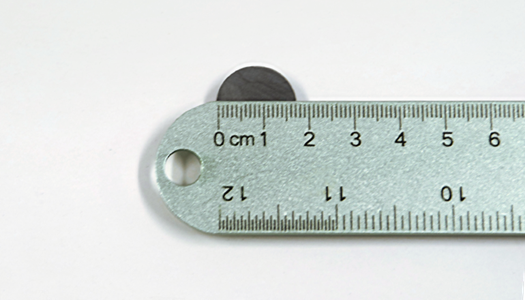
2 | Сверните лист бумаги так, чтобы он был немного шире магнита, и закрепите его скотчем. Это будет использоваться для намотки провода
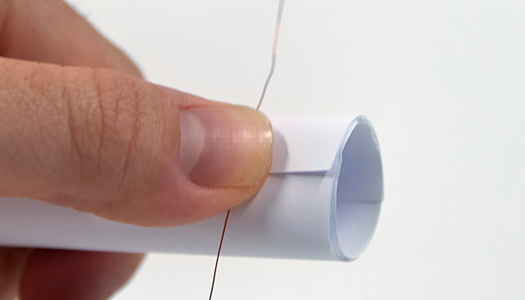
3 | Оставьте примерно 15 см проволоки в начале и намотайте проволоку примерно 50 раз. Чем больше накрутишь, тем громче динамик.

4 | Орамды аяқтағаннан кейін, сымды кесіңіз, екінші 6 дюймдік сымды соңында қалдырыңыз. Орамды түтіктен сырғытыңыз.
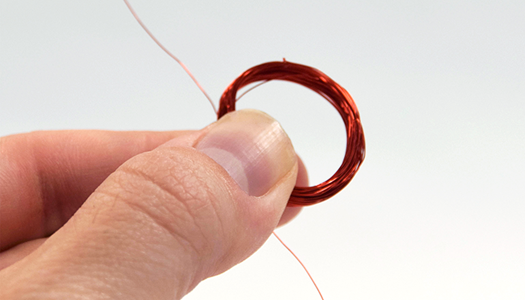
5 | Приклейте катушку клейкой лентой с противоположных сторон, затем аккуратно отшлифуйте концы проводов, сняв изоляцию.
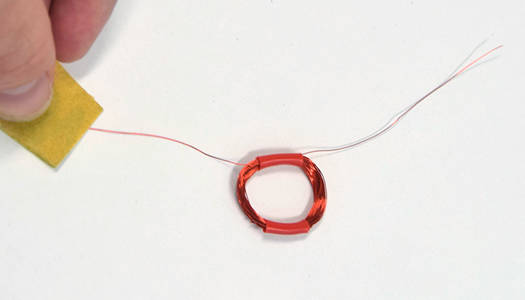
6 | Приклейте катушку ко дну чашки в центре.

7 | Поместите магнит в центр катушки и закрепите его скотчем.
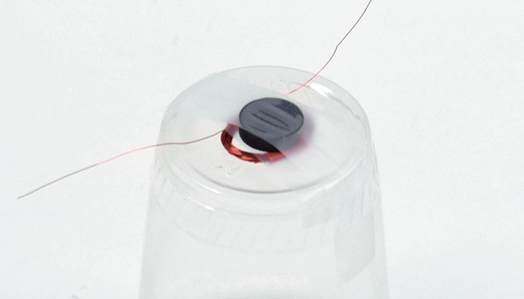
8 | Отсоедините зажимы типа «крокодил» от проводов электромагнита и прикрепите к проводам чашеобразного динамика.
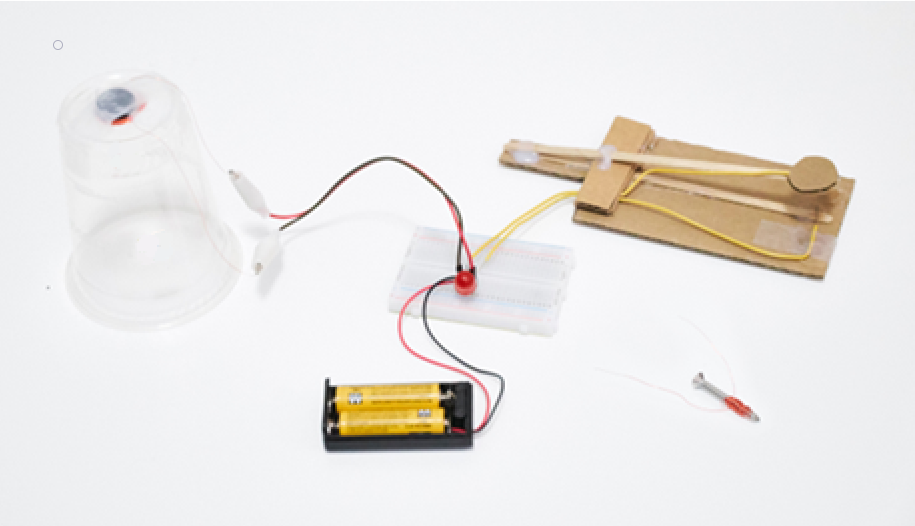
Отличная работа! Вы сделали динамик. Нажмите на выключатель, чтобы раздался щелчок. Поднесите динамик ближе к уху, если вы его не слышите.
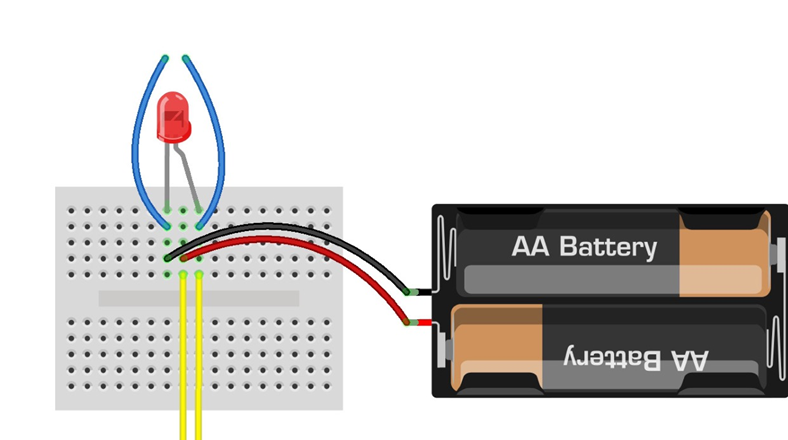
1 | Снимите светодиод и провода с переключателя прищепки и динамика с макетной платы. Вы будете повторно вставлять их в новые точки.
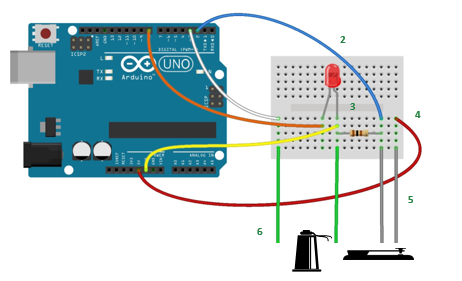
2 | Соедините Arduino Uno и макетную плату с помощью 5 перемычек, как показано на схеме. Цвет проводов полезен для организации, но не влияет на функциональность.
3 | Поместите светодиодную лампочку так, чтобы более длинная ножка (+) располагалась, как показано на схеме.
4 | Вставьте выводы резистора в макетную плату, как показано на рисунке.
5 | Подсоедините провода переключателя прищепки к макетной плате.
6 | Подсоедините динамик с пластиковой чашкой к макетной плате, вставив штыревые концы зажимов типа «крокодил», как показано на рисунке.
Отправьте азбуку Морзе своим телеграфом
Нажмите на выключатель. Вы увидите, как загорится светодиод, и услышите соответствующие звуки из динамика.
Поздравляем! Вы готовы визуализировать данные и общаться с помощью электричества!
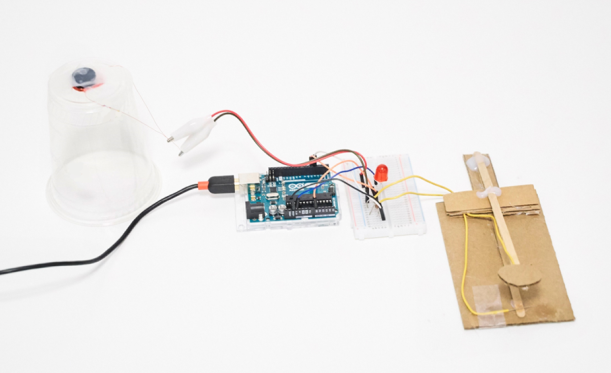
Также необходимо написать программу для отображения данных с телеграфа
Необходимо использовать монитор порта для вывода данных
Так как здесь используется сложная библиотека для работы с азбукой Морзе, то код здесь просто предоставляется учащимся и загружается.
const String DELIMETER = ",";    //Cordoba add-in expects a comma delimited string
const byte ledPin = 8;           //LED output pin
const byte keyPin = 2;           //telegraph key input pin
const byte speakerPin = 3;       //cup speaker output pin

/*
 * Telegraph key state (0=off, 1=on)
 */
byte keyState = 0;

/*
 * The timing of dots and dashes and spaces are very strict in the Morse Code specification.
 * The following values are the actual values:
 */
int wpm = 10;                     //words per minute - inidicates Morse Code speed
int unit = 1200/wpm;              //Time = 1200/wpm = unit in milliseconds
int dotTime     = unit;           //dot mark duration
int dashTime    = unit  * 3;      //dash mark duration
int markSpace   = unit;           //duration between marks
int signalSpace = unit  * 3;      //duration between letters
int wordSpace   = unit  * 7;      //duration between words

/*
 * For practical purposes a range is going to give better results than specific timings.
 * The following values are used in place of the strict values above.
 * Play around with the values below to get the best results.
 */
int dotMin          = dotTime/4;
int dotMax          = dashTime/2;

int dashMin         = dotMax;
int dashMax         = dashTime+(dotTime*2);

int signalSpaceMin  = signalSpace*2;
int signalSpaceMax  = wordSpace*2;

int wordSpaceMin    = signalSpaceMax;

/*
 * Timestamps and intervals used to determine duration of marks and spaces
 */
unsigned long currentTime = 0;    //current timestamp
unsigned long markTime    = 0;    //start of a positive signal (dot or dash)
unsigned long spaceTime   = 0;    //start of absence of signal (space)
unsigned long markInterval = 0;   //time interval for a mark
unsigned long spaceInterval = 0;  //time interval for a space/pause

/*
 * Program control variables to determine markTime and spaceTime processing
 */
bool startMark = 0;               //boolean to indicate a current signal
bool gotMark = 0;                 //indicates that we got a mark and can now process markTime
bool startSpace = 0;              //boolean to indicate a current pause
bool gotSpace = 0;                //indicates that we got a pause and can now process spaceTime
bool firstMark = 0;               //boolean to indicate that an intitial mark has been processed so we can now add space(s)

/*
 * Incoming serial data variables
 */
String mInputString = "";         // string variable to hold incoming data
boolean mStringComplete = false;  // variable to indicate mInputString is complete (newline found)
int mSerial_Interval = 75;        // Time interval between serial writes
unsigned long mSerial_PreviousTime = millis();    // Timestamp to track serial interval

/*
 * Variables sent to Excel
 */
String morseMessage = "";         //variable to hold our signal marks and spaces
const int charLimit = 20;         //morseMessage character limit
byte charCount = 0;               //number of marks and spaces in morseMessage
String signalArray[charLimit];    //array of signals sent from Excel

/*
 * Variables sent from Excel
 */
int serialMode = 0;               //1=Receive from Excel 0=Send to Excel
int receiveMessage = 0;           //Process incoming Morse Code message from Excel
int clearMessage = 0;             //Clear morseMessage

/*
 * setup()
 *
 * Initializations for Serial, input and output pins, and reserve space for morseMessage
 */
void setup()
{
  Serial.begin(9600);               //Initialize Serial communications
  pinMode(ledPin, OUTPUT);          //Initialize LED output pin
  pinMode(speakerPin, OUTPUT);      //Initialize cup speaker output pin
  pinMode(keyPin, INPUT);           //Initialize telegraph key input pin
  morseMessage.reserve(200);        //reserve 200 bytes to avoid memory fragmentation issues
}

/*
 * loop()
 *
 * This is the main loop that determines program flow.
 */
void loop()
{
  processIncomingSerial();          //process program control variables and messages from Excel

  if(serialMode==0)
  {                                 //SEND TO EXCEL (decode in Excel)==============================
    encodeOutgoingMorseCode();      //encode telegraph signals into Morse Code to send to Excel
  } else {                          //RECEIVE FROM EXCEL (encode in Excel)=========================
    decodeIncomingMorseCode();      //decode Morse signals into LED flashes and speaker tones
  }

  //send outgoing serial when we have a mark or space to send
  if(gotMark)                       //if we have a mark
  {
    processOutgoingSerial();        //send to serial
    gotMark = 0;                    //reset for new mark
  }
  if(gotSpace)                      //if we have a space
  {
    processOutgoingSerial();        //send to serial
    gotSpace = 0;                   //reset for new space
  }
}

/* ENCODE OUTGOING MORSE CODE /*
 * encodeOutgoingMorseCode()
 *
 * Encodes telegraph key presses and the pauses in between into a series of marks and spaces.
 * Spaces are processed while a signal is being received, marks are processed during pauses.
 *
 * 1. If received from Excel then Clear morseMessage
 *
 * 2. Determine keyState
 *    HIGH
 *      -turn on LED and Speaker for audio-visual indication of a key press
 *      -start a new mark (set markTime timestamp)
 *      -process previous pause (processSpaceTime)
 *
 *    LOW
 *      -turn off LED and Speaker for audio-visual indication of a pause
 *      -start a new space (set spaceTime timestamp)
 *      -process previous mark (processMarkTime)
 *
 * 3. If there was a valid mark or pause the updated morseMessage is sent to Excel.
 *
 */

void encodeOutgoingMorseCode()
{
  if(clearMessage){
    clearMorseMessage();          //clears morseMessage string variable
  }

  keyState = digitalRead(keyPin); //read the telegraph key state
  currentTime = millis();         //set the main timestamp

  //when the key is pressed (mark)
  if(keyState==HIGH)
  {
    digitalWrite(ledPin, HIGH);   //turn on LED
    tone(speakerPin, 800, 100);   //send tone to speaker
    if(!startMark)                //start of a new mark
    {
      markTime = currentTime;     //set markTime timestamp
      startMark = 1;              //we are tracking a mark
    }
    if(charCount < charLimit)     //if we have more characters left then
    {
      processSpaceTime();         //encode the duration of time between key presses
    }
  }

  //when the key is not pressed (pause/space)
  if(keyState==LOW)
  {
    digitalWrite(ledPin, LOW);    //turn off LED
    if(!startSpace)               //start of new space
    {
      spaceTime = currentTime;    //set spaceTime timestamp
      startSpace = 1;             //we are tracking a space
    }
    if(charCount < charLimit)     //if we have more characters left then
    {
      processMarkTime();          //encode the duration of time during key presses
    }
  }
}

/*
 * processMarkTime()
 *
 * This method determines the time interval that the telegraph key was pressed down and then
 * encodes this duration into a Morse Code mark (dot or dash).
 */
void processMarkTime()
{
  if(startMark) {                               //if markTime has been set
    if(firstMark==0)                            //if there are no marks yet morseMessage is cleared
    {
      clearMorseMessage();
    }
    markInterval = currentTime - markTime;      //get the markInterval and
    if(markInterval > dotMin)                   //if greater than dotMin
    {
      if(markInterval < dotMax)                 //and less than dotMax
      {
        morseMessage += ".";                    //it's a dot
      }
    }
    if(markInterval > dashMin)                  //if greater than dashMin
    {
      if(markInterval < dashMax)                //and less than dashMax
      {
        morseMessage += "-";                    //it's a dash
      }
    }
    startMark = 0;                              //stop processing markTime
    gotMark = 1;                                //either we got a mark or was too short/long so reset
    firstMark = 1;                              //prevents any space before initial mark
  }
}

/*
 * processSpaceTime()
 *
 * This method determines the time interval that the telegraph key was pressed down and then
 * encodes this pause into a space between signals or a space between words.
 */
void processSpaceTime()
{
  if(firstMark){                                //only process spaceTime after receiving an initial mark
    if(startSpace){                             //if spaceTime has been set
      spaceInterval = currentTime - spaceTime;  //get the spaceInterval
      if(spaceInterval > signalSpaceMin)        //if greater than signalMin
      {
        if(spaceInterval < signalSpaceMax)      //and less than signalMax
        {
          morseMessage += ",";                  //we have a new signal and need a new column in the serial message
          charCount++;                          //increment character count
        }
      }
      if(spaceInterval > wordSpaceMin)          //anything greater than wordSpaceMin and
      {
        morseMessage += ", ,";                  //we have a new word and need an empty column in the serial message
        charCount = charCount + 2;              //increment character count
      }
      startSpace = 0;                           //stop processing spaceTime
      gotSpace = 1;                             //we got a new signal space or nothing
    }
  }else{
    spaceTime = currentTime;                    //reset spaceTime
  }
}

void clearMorseMessage()
{
  morseMessage = " , , , , , , , , , , , , , , , , , , ,";         //send all empty characters to refresh cordoba data
  sendDataToSerial();                           //send directly to serial
  morseMessage = "";                            //reset to empty string
  charCount = 0;                                //reset character count
  clearMessage = 0;                             //reset clearMessage
  firstMark = 0;                                //reset firstMark
}

/*
 * ==========================================================================================================
 * DECODE INCOMING MORSE CODE ===============================================================================
 * ==========================================================================================================
 */

/*
 * decodeIncomingMorseCode()
 *
 * Decodes incoming Morse Code into LED and speaker output.
 *
 * If a receiveMessage command is received from Excel:
 * 1. Loops through each Morse Code signal in signalArray[]
 * 2. Loops through each character
 * 3. Determines mark or space and outputs LED and Speaker accordingly
 *
 */
void decodeIncomingMorseCode()
{
  if(receiveMessage)                                //if we have a new message trigger from Excel
  {
    bool previousSpace = 0;                         //prevents waiting for empty signals to process
    for(int c=0; c<charLimit; c++)                  //loop through signalArray
    {
      String morseCode = signalArray[c];            //get character from signalArray
      for(int m=0; m<morseCode.length(); m++)       //loop through each mark of each character
      {
        String mark = morseCode.substring(m, m+1);  //get mark

        //Interrupt so that switching modes can happen during decoding
        processIncomingSerial();                    //check incoming serial
        if(serialMode==0)                           //if the mode has changed to 0
        {                                           //then, to break out of loop
          c=charLimit;                              //set c to maximum
          m=c;                                      //set m to maximum
        }

        //decode each mark
        if(mark==".")                               //we have a dot
        {
          digitalWrite(ledPin, HIGH);               //turn on LED
          tone(speakerPin, 800, dotTime);           //send tone to speaker
          delay(dotTime);                           //delay for duration of dotTime
          digitalWrite(ledPin, LOW);                //turn off LED
          delay(markSpace);                         //delay for a pause between marks
          previousSpace = 0;
        }
        if(mark=="-")                               //we have a dash
        {
          digitalWrite(ledPin, HIGH);               //turn on LED
          tone(speakerPin, 800, dashTime);          //send tone to speaker
          delay(dashTime);                          //delay for duration of dashTime
          digitalWrite(ledPin, LOW);                //turn off LED
          delay(markSpace);                         //delay for a pause between marks
          previousSpace = 0;
        }
        if(mark==" ")                               //we have a space
        {
          if(previousSpace==0)                      //if the last mark was not a space
          {
            delay(wordSpace);                       //add pause of wordSpace
            previousSpace = 1;                      //indicates last mark was a space
          }
        }
      }
      if(previousSpace==0)                          //if the last mark was not a spac
      {
        delay(signalSpace);                         //add pause of signalSpace duration after each character
      }
    }
    receiveMessage = 0;                             //reset message trigger (from Excel)
  }
}

/*
 * -------------------------------------------------------------------------------------------------------
 * INCOMING SERIAL DATA FROM EXCEL PROCESSING CODE--------------------------------------------------------
 * -------------------------------------------------------------------------------------------------------
 */

void processIncomingSerial()
{
  getSerialData();
  parseSerialData();
}

/*
 * getSerialData()
 *
 * Gathers bits from serial port to build mInputString
 */
void getSerialData()
{
  while (Serial.available()) {
    char inChar = (char)Serial.read();      // get new byte
    mInputString += inChar;                 // add it to input string
    if (inChar == '\n') {                   // if we get a newline...
      mStringComplete = true;               // we have a complete string of data to process
    }
  }
}

/*
 * parseSerialData()
 *
 * Parse all program control variables and data from Excel
 */
void parseSerialData()
{
  if (mStringComplete) { // process data from mInputString to set program variables.
    //set variables using: var = getValue(mInputString, ',', index).toInt(); // see getValue function below

    serialMode      = getValue(mInputString, ',', 0).toInt();    //Data Out worksheet cell A5
    receiveMessage  = getValue(mInputString, ',', 1).toInt();    //Data Out worksheet cell B5
    clearMessage    = getValue(mInputString, ',', 2).toInt();    //Data Out worksheet cell C5

    for(int i=0; i<charLimit; i++)
    {
      String data = getValue(mInputString, ',', i+3);
      if(data=="")                //if we get an empty string
      {
        signalArray[i] = " ";     //add a space to the array
      }else{
        signalArray[i] = data;    //otherwise add the data string
      }
    }
    mInputString = "";                         // reset mInputString
    mStringComplete = false;                   // reset stringComplete flag
  }
}

/*
 * getValue()
 *
 * Gets value from mInputString using an index. Each comma delimited value in mInputString
 * is counted and the value of the matching index is returned.
 */
String getValue(String mDataString, char separator, int index)
{
  // mDataString is mInputString, separator is a comma, index is where we want to look in the data 'array'
  int matchingIndex = 0;
  int strIndex[] = {0, -1};
  int maxIndex = mDataString.length()-1;
  for(int i=0; i<=maxIndex && matchingIndex<=index; i++){     // loop until end of array or until we find a match
    if(mDataString.charAt(i)==separator || i==maxIndex){      // if we hit a comma OR we are at the end of the array
      matchingIndex++;                                        // increment matchingIndex to keep track of where we have looked
      strIndex[0] = strIndex[1]+1;                            // increment first substring index
      // ternary operator in objective c - [condition] ? [true expression] : [false expression]
      strIndex[1] = (i == maxIndex) ? i+1 : i;                // set second substring index
    }
  }
  return matchingIndex>index ? mDataString.substring(strIndex[0], strIndex[1]) : ""; // if match return substring or ""
}

/*
 * -------------------------------------------------------------------------------------------------------
 * OUTGOING SERIAL DATA TO EXCEL PROCESSING CODE----------------------------------------------------------
 * -------------------------------------------------------------------------------------------------------
 */

 /*
  * processOutgoingSerial()
  *
  * Processes outgoing data once every mSerial_Interval
  */
void processOutgoingSerial()
{
  if((millis() - mSerial_PreviousTime) > mSerial_Interval){ // Enter into this only when interval has elapsed
    mSerial_PreviousTime = millis(); // Reset serial interval timestamp
    sendDataToSerial();
  }
}

/*
 * sendDataToSerial()
 *
 * Sends morseMessage to Excel
 */
void sendDataToSerial()
{
  Serial.print(morseMessage);
  Serial.println();                   //send line ending to complete serial message
}