
3 апта
Телеграф құру
Бұл сабақта оқушылар:
- байланыс үшін телеграф құру
- телеграфты қосу схемасын құрастыру
- телеграфқа арналған динамикті құрастыру
- көрсетуге арналған бағдарламаны жазыңыз
Құрастыру нұсқаулары
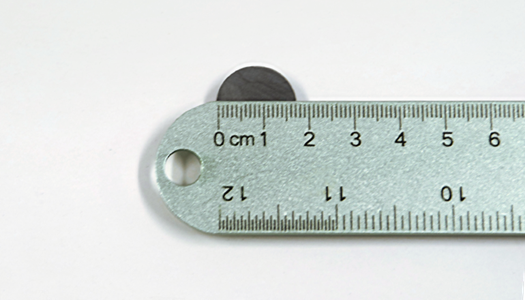
1 | Магниттің енін өлшеңіз.
2 | Қағаз парағын магниттен сәл кеңірек етіп бүктеп, таспамен бекітіңіз. Бұл сымды орау үшін пайдаланылады
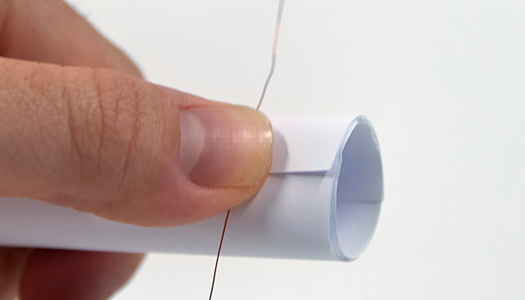
3 | Басында шамамен 15 см сым қалдырыңыз және сымды шамамен 50 рет ораңыз. Оны неғұрлым көп көтерсеңіз, динамик соғұрлым қатты болады.

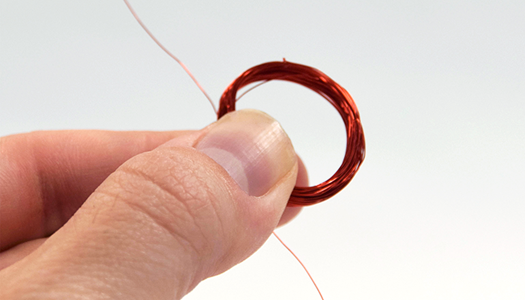
4 | Орамды аяқтағаннан кейін, сымды кесіңіз, екінші 6 дюймдік сымды соңында қалдырыңыз. Орамды түтіктен сырғытыңыз.
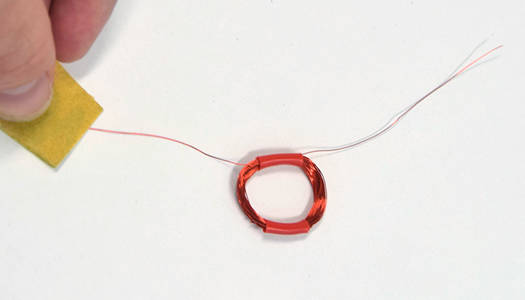
5 | Катушканы қарама-қарсы жақтарға жабыстырыңыз, содан кейін оқшаулауды алып тастау үшін сымдардың ұштарын мұқият тегістеңіз.
6 | Ортасындағы кесенің түбіне катушканы жабыстырыңыз.

7 | Магнитті катушканың ортасына қойып, оны таспамен бекітіңіз.
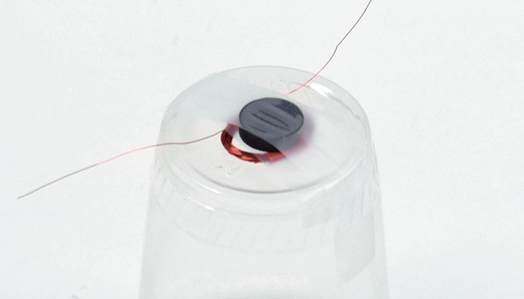
8 | Аллигатор қыстырғыштарын соленоид сымдарынан ажыратып, оларды ыдыстың динамик сымдарына бекітіңіз.
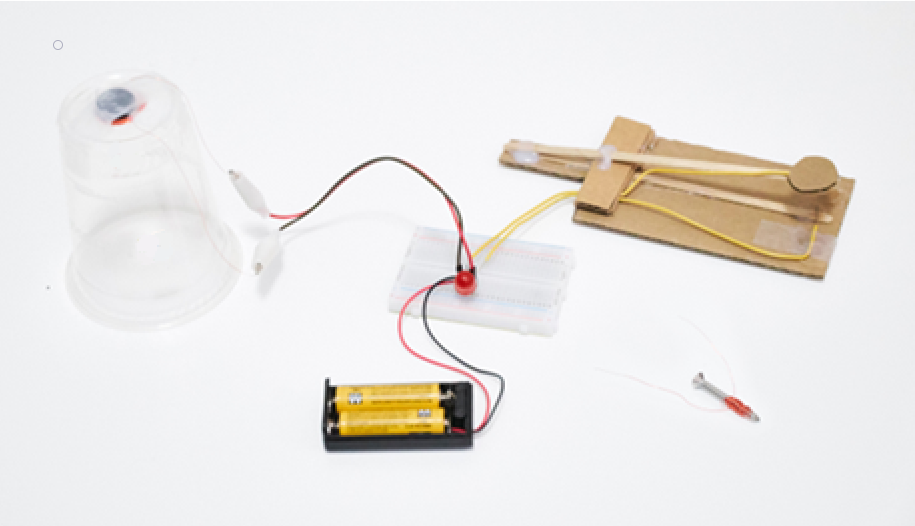
Жақсы жұмыс! Сіз динамик жасадыңыз. Коммутаторды сырт еткенше басыңыз. Егер сіз оны ести алмасаңыз, динамикті құлағыңызға жақындатыңыз.
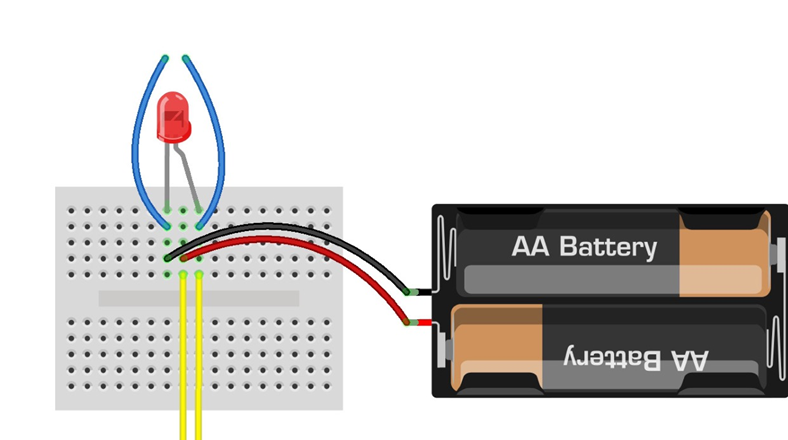
1 | Жарық диодты және сымдарды киім қысқышының қосқышынан және нан тақтасынан динамиктен алыңыз. Сіз оларды жаңа нүктелерге қайта енгізесіз.
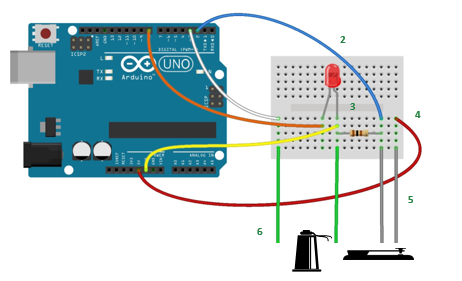
2 | Диаграммада көрсетілгендей 5 секіргіш арқылы Arduino Uno және нан тақтасын қосыңыз. Сымның түсі ұйым үшін пайдалы, бірақ функционалдылыққа әсер етпейді.
3 | Жарық диодты шамды ұзын аяқ (+) диаграммада көрсетілгендей етіп орналастырыңыз.
4 | Резистор сымдарын көрсетілгендей нан тақтасына салыңыз.
5 | Киім қыстырғышының қосқыш сымдарын нан тақтасына жалғаңыз.
6 | Көрсетілгендей аллигатор қыстырғыштарының еркек ұштарын салу арқылы пластикалық шыныаяқ динамигін нан тақтасына қосыңыз.
Морзе кодын телеграфпен жіберіңіз
Коммутаторды басыңыз. Жарық диодты шам жанып, динамиктен сәйкес дыбыстарды естисіз.
Құттықтаймыз! Сіз деректерді визуализациялауға және электр қуатын пайдаланып байланысуға дайынсыз!
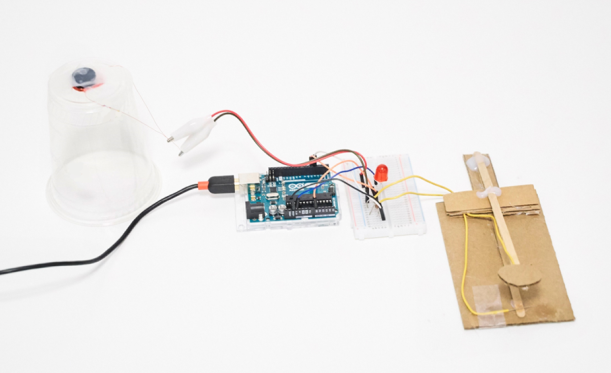
Сондай-ақ телеграфтан мәліметтерді көрсету үшін программа жазу қажет
Деректерді шығару үшін порт мониторын пайдалану керек
Ол күрделі Морзе кодының кітапханасын пайдаланатындықтан, код студенттерге жай ғана беріледі және жүктеледі.
const String DELIMETER = ",";    //Cordoba add-in expects a comma delimited string
const byte ledPin = 8;           //LED output pin
const byte keyPin = 2;           //telegraph key input pin
const byte speakerPin = 3;       //cup speaker output pin

/*
 * Telegraph key state (0=off, 1=on)
 */
byte keyState = 0;

/*
 * The timing of dots and dashes and spaces are very strict in the Morse Code specification.
 * The following values are the actual values:
 */
int wpm = 10;                     //words per minute - inidicates Morse Code speed
int unit = 1200/wpm;              //Time = 1200/wpm = unit in milliseconds
int dotTime     = unit;           //dot mark duration
int dashTime    = unit  * 3;      //dash mark duration
int markSpace   = unit;           //duration between marks
int signalSpace = unit  * 3;      //duration between letters
int wordSpace   = unit  * 7;      //duration between words

/*
 * For practical purposes a range is going to give better results than specific timings.
 * The following values are used in place of the strict values above.
 * Play around with the values below to get the best results.
 */
int dotMin          = dotTime/4;
int dotMax          = dashTime/2;

int dashMin         = dotMax;
int dashMax         = dashTime+(dotTime*2);

int signalSpaceMin  = signalSpace*2;
int signalSpaceMax  = wordSpace*2;

int wordSpaceMin    = signalSpaceMax;

/*
 * Timestamps and intervals used to determine duration of marks and spaces
 */
unsigned long currentTime = 0;    //current timestamp
unsigned long markTime    = 0;    //start of a positive signal (dot or dash)
unsigned long spaceTime   = 0;    //start of absence of signal (space)
unsigned long markInterval = 0;   //time interval for a mark
unsigned long spaceInterval = 0;  //time interval for a space/pause

/*
 * Program control variables to determine markTime and spaceTime processing
 */
bool startMark = 0;               //boolean to indicate a current signal
bool gotMark = 0;                 //indicates that we got a mark and can now process markTime
bool startSpace = 0;              //boolean to indicate a current pause
bool gotSpace = 0;                //indicates that we got a pause and can now process spaceTime
bool firstMark = 0;               //boolean to indicate that an intitial mark has been processed so we can now add space(s)

/*
 * Incoming serial data variables
 */
String mInputString = "";         // string variable to hold incoming data
boolean mStringComplete = false;  // variable to indicate mInputString is complete (newline found)
int mSerial_Interval = 75;        // Time interval between serial writes
unsigned long mSerial_PreviousTime = millis();    // Timestamp to track serial interval

/*
 * Variables sent to Excel
 */
String morseMessage = "";         //variable to hold our signal marks and spaces
const int charLimit = 20;         //morseMessage character limit
byte charCount = 0;               //number of marks and spaces in morseMessage
String signalArray[charLimit];    //array of signals sent from Excel

/*
 * Variables sent from Excel
 */
int serialMode = 0;               //1=Receive from Excel 0=Send to Excel
int receiveMessage = 0;           //Process incoming Morse Code message from Excel
int clearMessage = 0;             //Clear morseMessage

/*
 * setup()
 *
 * Initializations for Serial, input and output pins, and reserve space for morseMessage
 */
void setup()
{
  Serial.begin(9600);               //Initialize Serial communications
  pinMode(ledPin, OUTPUT);          //Initialize LED output pin
  pinMode(speakerPin, OUTPUT);      //Initialize cup speaker output pin
  pinMode(keyPin, INPUT);           //Initialize telegraph key input pin
  morseMessage.reserve(200);        //reserve 200 bytes to avoid memory fragmentation issues
}

/*
 * loop()
 *
 * This is the main loop that determines program flow.
 */
void loop()
{
  processIncomingSerial();          //process program control variables and messages from Excel

  if(serialMode==0)
  {                                 //SEND TO EXCEL (decode in Excel)==============================
    encodeOutgoingMorseCode();      //encode telegraph signals into Morse Code to send to Excel
  } else {                          //RECEIVE FROM EXCEL (encode in Excel)=========================
    decodeIncomingMorseCode();      //decode Morse signals into LED flashes and speaker tones
  }

  //send outgoing serial when we have a mark or space to send
  if(gotMark)                       //if we have a mark
  {
    processOutgoingSerial();        //send to serial
    gotMark = 0;                    //reset for new mark
  }
  if(gotSpace)                      //if we have a space
  {
    processOutgoingSerial();        //send to serial
    gotSpace = 0;                   //reset for new space
  }
}

/* ENCODE OUTGOING MORSE CODE /*
 * encodeOutgoingMorseCode()
 *
 * Encodes telegraph key presses and the pauses in between into a series of marks and spaces.
 * Spaces are processed while a signal is being received, marks are processed during pauses.
 *
 * 1. If received from Excel then Clear morseMessage
 *
 * 2. Determine keyState
 *    HIGH
 *      -turn on LED and Speaker for audio-visual indication of a key press
 *      -start a new mark (set markTime timestamp)
 *      -process previous pause (processSpaceTime)
 *
 *    LOW
 *      -turn off LED and Speaker for audio-visual indication of a pause
 *      -start a new space (set spaceTime timestamp)
 *      -process previous mark (processMarkTime)
 *
 * 3. If there was a valid mark or pause the updated morseMessage is sent to Excel.
 *
 */

void encodeOutgoingMorseCode()
{
  if(clearMessage){
    clearMorseMessage();          //clears morseMessage string variable
  }

  keyState = digitalRead(keyPin); //read the telegraph key state
  currentTime = millis();         //set the main timestamp

  //when the key is pressed (mark)
  if(keyState==HIGH)
  {
    digitalWrite(ledPin, HIGH);   //turn on LED
    tone(speakerPin, 800, 100);   //send tone to speaker
    if(!startMark)                //start of a new mark
    {
      markTime = currentTime;     //set markTime timestamp
      startMark = 1;              //we are tracking a mark
    }
    if(charCount < charLimit)     //if we have more characters left then
    {
      processSpaceTime();         //encode the duration of time between key presses
    }
  }

  //when the key is not pressed (pause/space)
  if(keyState==LOW)
  {
    digitalWrite(ledPin, LOW);    //turn off LED
    if(!startSpace)               //start of new space
    {
      spaceTime = currentTime;    //set spaceTime timestamp
      startSpace = 1;             //we are tracking a space
    }
    if(charCount < charLimit)     //if we have more characters left then
    {
      processMarkTime();          //encode the duration of time during key presses
    }
  }
}

/*
 * processMarkTime()
 *
 * This method determines the time interval that the telegraph key was pressed down and then
 * encodes this duration into a Morse Code mark (dot or dash).
 */
void processMarkTime()
{
  if(startMark) {                               //if markTime has been set
    if(firstMark==0)                            //if there are no marks yet morseMessage is cleared
    {
      clearMorseMessage();
    }
    markInterval = currentTime - markTime;      //get the markInterval and
    if(markInterval > dotMin)                   //if greater than dotMin
    {
      if(markInterval < dotMax)                 //and less than dotMax
      {
        morseMessage += ".";                    //it's a dot
      }
    }
    if(markInterval > dashMin)                  //if greater than dashMin
    {
      if(markInterval < dashMax)                //and less than dashMax
      {
        morseMessage += "-";                    //it's a dash
      }
    }
    startMark = 0;                              //stop processing markTime
    gotMark = 1;                                //either we got a mark or was too short/long so reset
    firstMark = 1;                              //prevents any space before initial mark
  }
}

/*
 * processSpaceTime()
 *
 * This method determines the time interval that the telegraph key was pressed down and then
 * encodes this pause into a space between signals or a space between words.
 */
void processSpaceTime()
{
  if(firstMark){                                //only process spaceTime after receiving an initial mark
    if(startSpace){                             //if spaceTime has been set
      spaceInterval = currentTime - spaceTime;  //get the spaceInterval
      if(spaceInterval > signalSpaceMin)        //if greater than signalMin
      {
        if(spaceInterval < signalSpaceMax)      //and less than signalMax
        {
          morseMessage += ",";                  //we have a new signal and need a new column in the serial message
          charCount++;                          //increment character count
        }
      }
      if(spaceInterval > wordSpaceMin)          //anything greater than wordSpaceMin and
      {
        morseMessage += ", ,";                  //we have a new word and need an empty column in the serial message
        charCount = charCount + 2;              //increment character count
      }
      startSpace = 0;                           //stop processing spaceTime
      gotSpace = 1;                             //we got a new signal space or nothing
    }
  }else{
    spaceTime = currentTime;                    //reset spaceTime
  }
}

void clearMorseMessage()
{
  morseMessage = " , , , , , , , , , , , , , , , , , , ,";         //send all empty characters to refresh cordoba data
  sendDataToSerial();                           //send directly to serial
  morseMessage = "";                            //reset to empty string
  charCount = 0;                                //reset character count
  clearMessage = 0;                             //reset clearMessage
  firstMark = 0;                                //reset firstMark
}

/*
 * ==========================================================================================================
 * DECODE INCOMING MORSE CODE ===============================================================================
 * ==========================================================================================================
 */

/*
 * decodeIncomingMorseCode()
 *
 * Decodes incoming Morse Code into LED and speaker output.
 *
 * If a receiveMessage command is received from Excel:
 * 1. Loops through each Morse Code signal in signalArray[]
 * 2. Loops through each character
 * 3. Determines mark or space and outputs LED and Speaker accordingly
 *
 */
void decodeIncomingMorseCode()
{
  if(receiveMessage)                                //if we have a new message trigger from Excel
  {
    bool previousSpace = 0;                         //prevents waiting for empty signals to process
    for(int c=0; c<charLimit; c++)                  //loop through signalArray
    {
      String morseCode = signalArray[c];            //get character from signalArray
      for(int m=0; m<morseCode.length(); m++)       //loop through each mark of each character
      {
        String mark = morseCode.substring(m, m+1);  //get mark

        //Interrupt so that switching modes can happen during decoding
        processIncomingSerial();                    //check incoming serial
        if(serialMode==0)                           //if the mode has changed to 0
        {                                           //then, to break out of loop
          c=charLimit;                              //set c to maximum
          m=c;                                      //set m to maximum
        }

        //decode each mark
        if(mark==".")                               //we have a dot
        {
          digitalWrite(ledPin, HIGH);               //turn on LED
          tone(speakerPin, 800, dotTime);           //send tone to speaker
          delay(dotTime);                           //delay for duration of dotTime
          digitalWrite(ledPin, LOW);                //turn off LED
          delay(markSpace);                         //delay for a pause between marks
          previousSpace = 0;
        }
        if(mark=="-")                               //we have a dash
        {
          digitalWrite(ledPin, HIGH);               //turn on LED
          tone(speakerPin, 800, dashTime);          //send tone to speaker
          delay(dashTime);                          //delay for duration of dashTime
          digitalWrite(ledPin, LOW);                //turn off LED
          delay(markSpace);                         //delay for a pause between marks
          previousSpace = 0;
        }
        if(mark==" ")                               //we have a space
        {
          if(previousSpace==0)                      //if the last mark was not a space
          {
            delay(wordSpace);                       //add pause of wordSpace
            previousSpace = 1;                      //indicates last mark was a space
          }
        }
      }
      if(previousSpace==0)                          //if the last mark was not a spac
      {
        delay(signalSpace);                         //add pause of signalSpace duration after each character
      }
    }
    receiveMessage = 0;                             //reset message trigger (from Excel)
  }
}

/*
 * -------------------------------------------------------------------------------------------------------
 * INCOMING SERIAL DATA FROM EXCEL PROCESSING CODE--------------------------------------------------------
 * -------------------------------------------------------------------------------------------------------
 */

void processIncomingSerial()
{
  getSerialData();
  parseSerialData();
}

/*
 * getSerialData()
 *
 * Gathers bits from serial port to build mInputString
 */
void getSerialData()
{
  while (Serial.available()) {
    char inChar = (char)Serial.read();      // get new byte
    mInputString += inChar;                 // add it to input string
    if (inChar == '\n') {                   // if we get a newline...
      mStringComplete = true;               // we have a complete string of data to process
    }
  }
}

/*
 * parseSerialData()
 *
 * Parse all program control variables and data from Excel
 */
void parseSerialData()
{
  if (mStringComplete) { // process data from mInputString to set program variables.
    //set variables using: var = getValue(mInputString, ',', index).toInt(); // see getValue function below

    serialMode      = getValue(mInputString, ',', 0).toInt();    //Data Out worksheet cell A5
    receiveMessage  = getValue(mInputString, ',', 1).toInt();    //Data Out worksheet cell B5
    clearMessage    = getValue(mInputString, ',', 2).toInt();    //Data Out worksheet cell C5

    for(int i=0; i<charLimit; i++)
    {
      String data = getValue(mInputString, ',', i+3);
      if(data=="")                //if we get an empty string
      {
        signalArray[i] = " ";     //add a space to the array
      }else{
        signalArray[i] = data;    //otherwise add the data string
      }
    }
    mInputString = "";                         // reset mInputString
    mStringComplete = false;                   // reset stringComplete flag
  }
}

/*
 * getValue()
 *
 * Gets value from mInputString using an index. Each comma delimited value in mInputString
 * is counted and the value of the matching index is returned.
 */
String getValue(String mDataString, char separator, int index)
{
  // mDataString is mInputString, separator is a comma, index is where we want to look in the data 'array'
  int matchingIndex = 0;
  int strIndex[] = {0, -1};
  int maxIndex = mDataString.length()-1;
  for(int i=0; i<=maxIndex && matchingIndex<=index; i++){     // loop until end of array or until we find a match
    if(mDataString.charAt(i)==separator || i==maxIndex){      // if we hit a comma OR we are at the end of the array
      matchingIndex++;                                        // increment matchingIndex to keep track of where we have looked
      strIndex[0] = strIndex[1]+1;                            // increment first substring index
      // ternary operator in objective c - [condition] ? [true expression] : [false expression]
      strIndex[1] = (i == maxIndex) ? i+1 : i;                // set second substring index
    }
  }
  return matchingIndex>index ? mDataString.substring(strIndex[0], strIndex[1]) : ""; // if match return substring or ""
}

/*
 * -------------------------------------------------------------------------------------------------------
 * OUTGOING SERIAL DATA TO EXCEL PROCESSING CODE----------------------------------------------------------
 * -------------------------------------------------------------------------------------------------------
 */

 /*
  * processOutgoingSerial()
  *
  * Processes outgoing data once every mSerial_Interval
  */
void processOutgoingSerial()
{
  if((millis() - mSerial_PreviousTime) > mSerial_Interval){ // Enter into this only when interval has elapsed
    mSerial_PreviousTime = millis(); // Reset serial interval timestamp
    sendDataToSerial();
  }
}

/*
 * sendDataToSerial()
 *
 * Sends morseMessage to Excel
 */
void sendDataToSerial()
{
  Serial.print(morseMessage);
  Serial.println();                   //send line ending to complete serial message
}