
Week 3
This week you will learn how to create an HTML table. You will also release the class schedule in the same schedule.
Create a HTML table
HTML tables display data using rows and columns. They can contain both plain text and images or videos.
The table element is a container tag that contains the contents of a table. The table is built row by row: the tr container is used to designate a row, the th container is used to designate column (row) headers, and the td container is used to designate data in cells. Headings are bold and centered in their cells. The data is in regular font and aligned to the left side of the cell.
<col> – table column tag;
<colgroup> – table column group tag;
<thead> – table header tag;
<tbody> – tag of the main part of the table;
<tfoot> – table footer tag;
<caption> – table caption tag.
<border> – table border tag.
pading – sets the width of the table border in pixels.
height – specifies the height of the entire table in pixels, or as a percentage of the height of the browser window. Can also be used on a single cell day.
Laboratory work №1.
Drawing up a table for the class schedule
Step 1.Create a table.HTML file in Notepad in a separate folder.
Step 2. Enter the code in the table.HTML file.
<html>
<head>
 <meta http-equiv="Content-Type" content="text/html; charset=UTF-8">
<title>Class Schedule</title>
   <body>
    <div>
<h1>Schedule of classes</h1>
    </div>
    <table bgcolor="#000000" cellspacing="0" class="table">
<tr class="th_a">
  <thcolspan="7"></th>
</tr>
<tr bgcolor="#0000ff">
  <th width="40">№</th>
  <th width="70">Time</th>
  <th width= "100">Monday</th>
  <th width= "100">Tuesday</th>
  <th width= "100">Wednesday</th>
  <th width= "100">Thursday</th>
  <th width= "100">Friday</th>
	</tr>
	<tr class="th_c">
 	<th colspan="7"></th>
	</tr>
	<tr bgcolor="#ffffff">
 	<td>1</td>
 	<td> <br/> </td>
 	<td> </td>
 	<td> </td>
 	<td> </td>
 	<td> </td>
 	<td> </td>
	</tr>
	<tr bgcolor="#ffffff">
 	<td>2</td>
 	<td> <br/> </td>
 	<td> </td>
 	<td> </td>
 	<td> </td>
 	<td> </td>
 	<td> </td>
	</tr>
	<tr bgcolor="#ffffff">
 	<td>3</td>
 	<td> <br/> </td>
 	<td> </td>
 	<td> </td>
 	<td> </td>
 	<td> </td>
 	<td> </td>
	</tr>
	<tr bgcolor="#ffffff">
 	<td>4</td>
 	<td> <br/> </td>
 	<td> </td>
 	<td> </td>
 	<td> </td>
 	<td> </td>
 	<td> </td>
	</tr>
	<tr bgcolor="#ffffff">
 	<td>5</td>
 	<td> <br/> </td>
 	<td> </td>
 	<td> </td>
 	<td> </td>
 	<td> </td>
 	<td> </td>
	</tr>
        <tr bgcolor="#ffffff">
 	<td>6</td>
 	<td> <br/> </td>
 	<td> </td>
 	<td> </td>
 	<td> </td>
 	<td> </td>
 	<td> </td>
	</tr>
   </table>
  </body>
</head>
<style>
.table th {
 color:#ffffff;
 padding: 3;
 vertical-align: top;
 border-top: 2px solid #000000;
 border-bottom: 2px solid #000000;
}
.table td {
 padding: 3;
 vertical-align: top;
 height: 80;
 border-bottom: 2px dashed #000000;
}
.table th, .table td {
  border-left: 2px solid #000000;
}
.table th:last-child, .table td:last-child {
  border-right: 2px solid #000000;
}
.table td:first-child {
 font-weight: bold;
}
.table tr:last-of-type > td {
 border-bottom: 2px solid #000000;
}
.table .th_a > th {
 height: 0;
 padding: 2;
 background-color:#ffffff;
 border-bottom: 0px solid #000000;
}
.table .th_c > th {
 height: 0;
 padding: 2;
 background-color:#ffffff;
 border-top: 0px solid #000000;
}
</style>
</html>
Step 3. Refresh and review the changes in the browser.
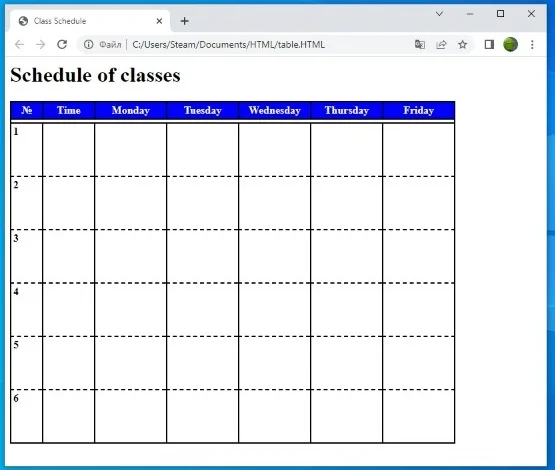
Step 4. Analyze the HTML code by looking at the result that appears in the browser.
Laboratory work №2.
Class schedule for Tuesday
Step 1.Open the table.HTML webpage text in the notepad in the folder.
Step 2: Make changes to the table.HTML file.
<html>
<head>
 <meta http-equiv="Content-Type" content="text/html; charset=UTF-8">
 <title>Class Schedule</title>
  <body>
   <div>
<h1>Schedule of classes</h1>
   </div>
   <table bgcolor="#000000" cellspacing="0" class="table">
<tr class="th_a">
 <thcolspan="7"></th>
</tr>
<tr bgcolor="#0000ff">
 <th width="40">№</th>
 <th width="70">Time</th>
 <th width= "100">Monday</th>
 <th width= "100">Tuesday</th>
 <th width= "100">Wednesday</th>
 <th width= "100">Thursday</th>
 <th width= "100">Friday</th>
</tr>
<tr class="th_c">
 <thcolspan="7"></th>
</tr>
<tr bgcolor="#ffffff">
 <td>1</td>
 <td>8:00 <br/>8:40 </td>
 <td>Kazakh language</td>
 <td>Mathematics</td>
 <td>English</td>
 <td>Kazakh language</td>
 <td>History of Kazakhstan</td>
</tr>
<tr bgcolor="#ffffff">
 <td>2</td>
 <td>8:45 <br/>9:25 </td>
 <td> Kazakh literature </td>
 <td>Computer science</td>
 <td>Kazakh language</td>
 <td> Russian Literature</td>
 <td> Russian language </td>
</tr>
<tr bgcolor="#ffffff">
 <td>3</td>
 <td>9:30 <br/>10:10 </td>
 <td>Science</td>
            <td>Kazakh literature</td>
            <td>Mathematics</td>
            <td>English</td>
            <td>Computer science</td>
</tr>
<tr bgcolor="#ffffff">
 <td>4</td>
 <td>10:15 <br/>10:55 </td>
 <td>Music</td>
 <td>History of Kazakhstan</td>
            <td>Physical culture</td>
            <td>Science</td>
 <td>Mathematics</td>
</tr>
<tr bgcolor="#ffffff">
 <td>5</td>
 <td>11:05 <br/>11:45 </td>
 <td>World History</td>
 <td> </td>
 <td>Physical culture</td>
 <td>Artistic work</td>
 <td>Drawing</td>
</tr>
<tr bgcolor="#ffffff">
 <td>6</td>
 <td>11:50 <br/>12:30 </td>
 <td> </td>
 <td> </td>
 <td> </td>
 <td>Artistic work</td>
 <td> </td>
</tr>
  </table>
  </body>
</head>
<style>
.table th {
 color:#ffffff;
 padding: 3;
 vertical-align: top;
 border-top: 2px solid #000000;
 border-bottom: 2px solid #000000;
}
.table td {
 padding: 3;
 vertical-align: top;
 height: 80;
 border-bottom: 2px dashed #000000;
}
.table th, .table td {
  border-left: 2px solid #000000;
}
.table th:last-child, .table td:last-child {
  border-right: 2px solid #000000;
}
.table td:first-child {
 font-weight: bold;
}
.table tr:last-of-type > td {
 border-bottom: 2px solid #000000;
}
.table .th_a > th {
 height: 0;
 padding: 2;
 background-color:#ffffff;
 border-bottom: 0px solid #000000;
}
.table .th_c > th {
 height: 0;
 padding: 2;
 background-color:#ffffff;
 border-top: 0px solid #000000;
}
</style>
</html>
Step 3: Open table.HTML from a browser.
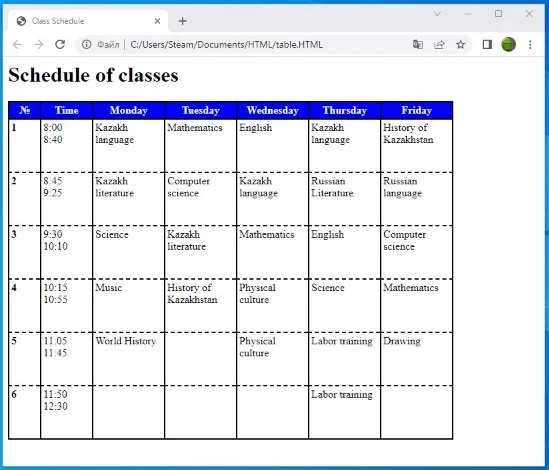
Step 4. Analyze the HTML code by looking at the result that appears in the browser.